
- 1. M2X - Interface for communication between mobile robots and peripherals in industrial environments
- 2. Scope
- 3. M2X protocol specification
- 4. General topic structure
- 5. Requests
- 6. Load handling interface
- 6.1. Requirements for a M2X load handling station
- 6.2. Safety considerations for load handling
- 6.3. Errors
- 6.4. Load handling unit
- 6.5. Load handling sequence diagram
- 6.6. Topics
- 6.7. Load handling JSON schemas and subtopics
- 6.8. Requests
- 6.9. Load handling station state
- 6.10. Load handling station factsheet
- 7. Transport order interface
- 8. Door interface
- 9. Signaling device interface
- 10. Elevator interface
- 11. Charging Device Interface
- 12. List of abbreviations
- 13. Glossary
1. M2X - Interface for communication between mobile robots and peripherals in industrial environments
Version 0.9.0, June 2026
1.1. Disclaimer
The following explanations are intended to provide guidance for defining interfaces and executing communication between mobile robots, fleet management systems, and other participants in an industrial environment, such as load handling stations, transport order systems, and peripherals. They are intended to be freely accessible to all users and are non-binding. Any party choosing to apply the M2X interface definition is responsible for ensuring its correct and appropriate use in each specific case. Users must consider the applicable state of the art at the time the interface definition is applied. The use of M2X does not relieve any party of responsibility for its own actions, implementation, integration, operation, or adaptation in practice. These explanations do not claim to be exhaustive, nor do they constitute an authoritative interpretation of existing laws. They do not replace the need to review and comply with relevant policies, legislation, or regulations. In addition, the specific characteristics of the respective products, systems, and their various potential applications must be considered. Responsibilities regarding implementation and adaptation in practice must be documented among the involved parties. M2X also requires that the data quality of an implementation is sufficiently good and that there is consensus among the parties involved on terminology and the interpretation of the interface. All users apply M2X at their own responsibility and risk. Any liability on the part of the project partners, contributors, or any individuals involved in the development or application of M2X is excluded. If you identify any inaccuracies in the application of the proposals or the possibility of an incorrect interpretation, please report them in the official issues of the M2X GitHub repository so that any necessary corrections can be made.
1.2. Foreword
M2X (Machine to X) is a research project developed by the Chair of Material Handling and Warehousing at TU Dortmund University and the Fraunhofer Institute for Material Flow and Logistics IML (associated partner). The project is supported by the VDMA (German, Verband Deutscher Maschinen- und Anlagenbau e. V.) and various partners from industry. The content is developed jointly between the research partners and industry, and the result is made publicly available in the form of the M2X interface definition. The aim is to design universally applicable interfaces for communication between the fleet management (FM)/mobile robots (MR) (such as automated guided vehicles (AGVs) or autonomous mobile robots (AMRs)) and other participants in an industrial environment like load handling stations, transport orders, peripherals etc. Proposed changes, bug fixes, issues, or pull requests to the interface are to be posted in the GitHub repository. The latest official documentation can be found on the GitHub page. They will be jointly evaluated by the working group and, if the decision is positive, adopted in a new version. New content will be pre-released in the private repository. News updates on content or meetings can be found at the LinkedIn page. For direct contact via email, please refer to sven.franke@tu-dortmund.de and dennis.luensch@iml.fraunhofer.de The project is a work in progress.
1.3. Introduction
Warehousing is increasingly relying on MRs. However, the implementation of MR systems is both time-consuming and cost-intensive and is a challenge for both large companies and SMEs (small and medium sized companies). Interface definitions such as VDA 5050 standardize the connection between a FM and MRs and enable the cost-efficient use of heterogeneous fleets through interoperability. The M2X project, aims to reduce integration costs through further standardization in the MR context. Further necessary interfaces are identified and described using easily applicable, generally valid models. M2X enables companies to integrate automation quickly and cost-effectively. This gives companies a sustainable competitive advantage and secures their future on the market. The project and the associated requirements are defined and iteratively adapted in close communication with our partners. The interfaces identified so far for M2X are as follows:
-
Load handling,
-
Transport orders,
-
Peripherals (doors, elevators, signaling devices, charging devices)
The project is funded by the Federal Ministry for Economic Affairs and Climate Protection (BMWK) as part of the Industrial Collective Research (IGF).
2. Scope
The aim of the interface is to simplify the commissioning of MR systems in an existing industrial environment (peripherals, load handling stations, transport orders) when used in industry. The interface should enable the seamless operation of different peripherals from different manufacturers and conventional systems (existing systems). Figure 1 shows the idea of the M2X framework. In detail, this is to be achieved through the following points:
-
Description of a standardized communication between MRs or FM and existing environment.
-
Increased flexibility and autonomy of MR systems in the industrial environment.
-
M2X provides communication processes and -content of the participants. Sequence diagrams and JSON schemas are provided for this purpose. The technical implementation is not prescribed and can take place at various levels, such as MR or FM and the environment itself. Implementation examples and best practices are provided.
-
The interfaces presented should come as close as possible to plug-and-play solutions.
-
The interfaces are developed from simple to complex contents or use cases.
-
M2X will provide no safety considerations in the JSON schemas in a detailed level, but there can be use cases or examples on how to deal with the most occurring safety issues. Safe communication protocols, e.g. via PROFIsafe, are not considered.
-
M2X will be fully compatible with the VDA 5050 but it is not a requirement to use M2X.
-
The description of the communication is described middleware-neutral. Nevertheless, it is assumed that the communication type follows a topic-based publish-subscribe pattern.
-
FM describes the management, planning, control and monitoring of vehicle fleets. This involves coordinating, evaluating and optimizing vehicle routes, taking into account certain influencing parameters. An FM service is available for every MR. It can be either centralized or decentralized. Centralized in terms of coordinating the underlying MRs (e.g., VDA 5050). In terms of decentralized planning, the MR includes its own local FM service.
-
Every M2X interface follows the same structure and is described in the same way:
-
Participants describe themselves with a factsheet, which contains all necessary information about the participant.
-
Communication is request-based, meaning that the participant is asked to respond to a request.
-
Requests are communicated with the states: PENDING, RUNNING, PAUSED, FINISHED, FAILED.
-
Requests shall be canceled via requestCancel.
-
There can only be one active request per participant with a peripheral device. This applies to every peripheral device and must be actively monitored by FM. Old requests are deleted by requestCancel. Old open requests can be read from the states after failure. Exception: The door interface can keep doors open over multiple requestTransit interactions.
-
JSON schemas are provided for the factsheets, states and requests.
-
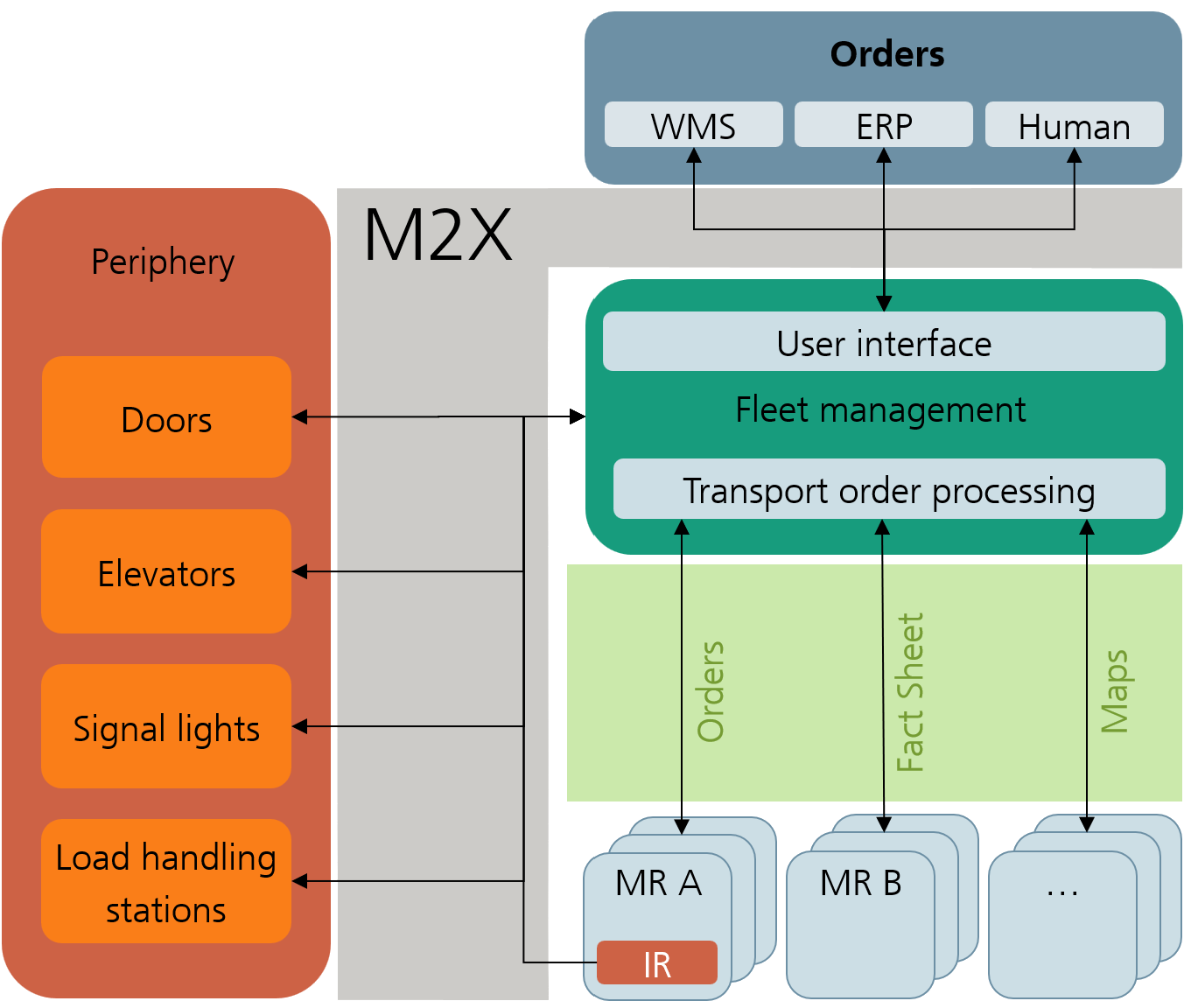
The scope of M2X is not to operate at the PLC level. Described communication is located on a higher level with logic that manages states of the peripheral and communication processes. Besides that, more complex communication protocols with a publish-subscribe pattern are used. Hence, M2X assumes that the communication and state management is done by a specialized software, within this document called "Proxy". Depending on the M2X support of the peripheral, several different software solutions for legacy and future peripherals are possible. The following figures show the various solutions for setting up peripheral devices in an MR system with M2X.
Figure 2 illustrates the current status of integrating peripherals into a MR system. Peripherals are typically integrated and controlled by the FM. Hence, the proprietary interface of the peripheral is used and tailored to the customer.
To overcome this monolithic FM approach, M2X provides a standardized interface to interact with the peripheral. Thus, the FM does not need to handle and control the peripheral directly. Consequently, the responsibility of the FM is reduced, making the software leaner and more flexible in the event of changes to the system due to the connection of standardized interfaces. Figure 3 shows the implementation for current and legacy systems. Here, the logic and the proprietary interface of the peripheral are managed by a proxy. In this case, the proxy must be supplied subsequently, which can be carried out by an integrator, the FM supplier etc. Hereby, the proxy can manage multiple peripherals of the same type from one or different manufacturers. It is also possible to manage different types of peripherals. The complexity is up to the developer and supplier of the proxy.
The aim of standardization should be the direct application of the standard. This means that future peripherals will be directly compatible with the M2X standard. Hence, the manufacturer of the peripheral will implement the M2X standard themselves by providing an external proxy for the peripheral or an all-in-one solution (cf. Figure 4). To meet the requirements of Industry 4.0 and its self-management principles, each device will have its own proxy for autonomous communication and management.
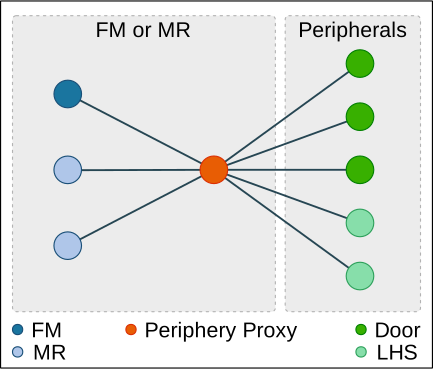
Figure 2.
|
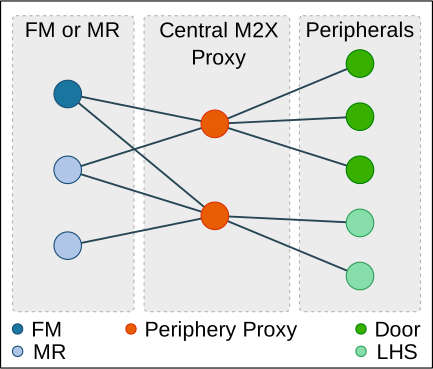
Figure 3.
|
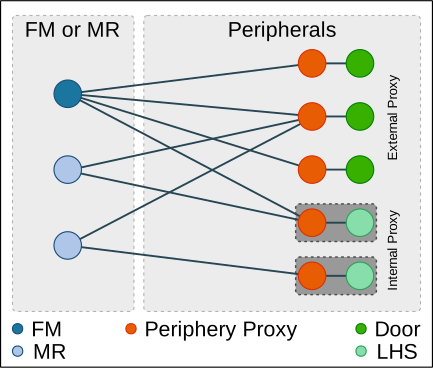
Figure 4.
|
2.1. Other applicable documents
| document | title |
|---|---|
ISO 8373:2021(en) |
Robotics - Vocabulary |
VDA 5050 |
Interface for the communication between automated guided vehicles (AGV) and a master control |
VDI 2510 |
Automated Guided Vehicle Systems (AGVS) |
VDI 2710 |
Interdisciplinary design of automated guided vehicle systems (AGVS) |
VDI 4451 |
Compatibility of Automated Guide Vehicle Systems (AGVS) |
DIN EN ISO 3691-4 |
Industrial trucks - Safety requirements and verification - Part 4: Driverless industrial trucks and their systems |
3. M2X protocol specification
The following section describes the details of the communication protocol. The protocol specifies the communication between the MR/FM and the environment.
The different messages are presented in tables describing the contents of the fields of the JSON that is sent as a request, state, etc.
In addition, JSON schemas are available for validation in the corresponding GitHub repository. The JSON schemas are updated with every release of M2X. If a conflict between tables/examples and schemas occurs, the JSON schemas are the normative source for implementation.
The recommended transport protocol is Message Queuing Telemetry Transport (MQTT), which is to be used in conjunction with a JSON structure. MQTT is TCP (Transmission Control Protocol) based and allows the distribution of messages to subchannels, which are called "topics". Participants in the MQTT network subscribe to these topics and receive information that concerns or interests them. Other message protocols can also be used, for example, OPC UA (Open Platform Communications Unified Architecture) or other who are real-time capable over UDP (User Datagram Protocol).
3.1. Symbols of the tables and meaning of formatting
The table contains the name of the identifier, its unit, its data type, and a description, if any.
| identification | description |
|---|---|
standard |
Variable is an elementary data type. |
bold |
Variable is a non-elementary data type (e.g., JSON object or array) and defined separately. |
italic |
Variable is optional. |
italic and bold |
Variable is optional and a non-elementary data type. |
arrayName [arrayDataType] |
Variable (here arrayName) is an array of the data type included in the square brackets (here the data type is arrayDataType). |
All keywords are case-sensitive. All field names are in camelCase. Enumerations for states and error types are in UPPER_SNAKE_CASE. Request names in requestType use lowerCamelCase.
3.2. Permitted characters and field lengths
All communication is encoded in UTF-8 to enable international adaptation of descriptions. The recommendation is that IDs should only use the following characters: A-Z a-z 0-9 _ - . :
A maximum message length is not defined. If an entity’s memory is insufficient to process an incoming request, it must reject the request. The matching of maximum field lengths, string lengths or value ranges is up to the integrator. For ease of integration, vendors must supply a factsheet that is detailed in the corresponding section.
3.3. Notation of enumerations
Enumerations for states and error types must be written in UPPER_SNAKE_CASE. This includes keywords such as request and action states (RUNNING, FINISHED, FAILED, etc.).
3.4. JSON datatypes
Where possible, JSON data types must be used. A Boolean value is thus encoded by "true / false", NOT with an enumeration (TRUE, FALSE) or magic numbers.
4. General topic structure
Since M2X assumes a publish-subscribe communication, the following topic structure is used:
/interfaceName/majorVersion/uniqueEntityName/topic
Description of the elements:
-
interfaceName: Name of the interface (e.g. lhs (load handling station), door, elv (elevator)). The detailed definition of the interface is described in the respective sections.
-
majorVersion: Major version of the M2X protocol.
-
uniqueEntityName: Unique name of the entity (e.g., lhs_dispatch_1, etc.). Besides a human-readable name, a unique identifier like a serial number can also be used.
-
topic: The topic of the message (e.g. request, status, factsheet, etc.). Possible topics are defined and described in the respective sections of the entities.
5. Requests
M2X uses a request-response mechanism for interactions between MR/FM and peripheral devices. All requests, associated parameters and their states are predefined in the respective JSON schemas or tables. A request is initiated by the MR/FM via the request topic and tracked via state messages. There can only be one active request per participant with a peripheral device. This applies to every peripheral device and must be actively monitored by FM or the device itself. Old requests are deleted by requestCancel. Old open requests can be read from state history after a failure.
The requests run through the following states:
| state | description |
|---|---|
PENDING |
The request is pending and has not yet been executed. |
RUNNING |
The request is currently being executed. |
PAUSED |
The request is paused. This can be either physical (safety light curtains are not yet released) or management-related. |
FINISHED |
The request has been successfully FINISHED. |
FAILED |
The request could not be FINISHED. |
The elements of the corresponding JSON schema are explained in the following table.
| field | data type | description |
|---|---|---|
timestamp |
string |
Timestamp in ISO8601 format (YYYY-MM-DDTHH:mm:ss.sssZ). |
version |
string |
Version of the M2X protocol [Major].[Minor].[Patch] (e.g. 1.3.2). |
requests [request] { |
array |
Describes a request that the entity can perform. |
requestType |
string |
Name of the request as described in the first column of the predefined requests table for all interfaces. Identifies the function of the request. Enum: requestAccess, requestExit, requestLoadTransfer, requestRelease, requestFactsheet, requestContinueLoadTransfer, requestCancel, requestTransportOrder, requestTransit, requestSignal, requestElevator, requestChangeFloor, requestManualMode, requestStartCharge, requestStopCharge. |
requestId |
string |
Unique ID to identify the request and map them to the requestState in the state. Suggestion: Use UUIDs. |
requestDescription |
string |
Additional information on the request. |
requestParameters [requestParameter] { |
array |
Array of requestParameter-objects for the indicated request e. g. deviceId, loadId, external Triggers. |
key |
string |
The key of the request parameter. |
value |
array, |
The value of the request parameter. |
} |
||
} |
6. Load handling interface
M2X provides communication content and communication processes for the description of load handling/transfer. Communication during load handling can take place between FM and station or MR and station. The MR actively transfers or receives a load to a load handling station or vice versa. The transfer or receipt of a load is called PICK or DROP, which only refers to the physical process and not an action as in VDA 5050.
Definition of load handling: Load handling refers to the handover of a load at a transfer point or point of interest (PoI). A PoI is referenced by a unique identifier. This includes the entry, the physical handover/manipulation and the exit of an MR at a station. Once the physical load transfer of a MR is in progress, it should not be paused. The PoI can also be an MR that an MR to MR load handling is possible, where the MR acts as a load handling station or the load handling point respectively.
Definition load handling station: A load handling station (LHS) serves as a PoI at which the load is transferred or changed/manipulated. The station can have multiple load handling points which are comparable to a VDA 5050 “node”. To avoid confusion regarding the VDA 5050, it is called load handling point. The LHS will provide no traffic management. It is assumed that there is a traffic management that takes care of the coordination of the MRs. Hence, the coordination and deadlock avoidance of the MRs at the different load handling points is managed by the traffic management. Meaning that the station will only manage the interaction areas of the load handling points. The station can decide if a MR can approach a load handling point or not. The LHS factsheet includes the geometry of the physical station (footprint of the station). The area around is managed by the FM.
Definition load handling point: A load handling point (LHP) is a physical point of a LHS where the load is transferred or changed/manipulated. Only one MR can interact with a LHP at the same time. The LHP can be approached from different directions (list of polygons) (cf. Figure 5). A load can be picked up or dropped off by a mobile robot at a LHP. The LHP describes the geometric center of the load for pick-up or delivery. The geometric center of a load is explained in the section Section: Load Handling Unit. The LHP can be considered as reached when the MR is within the interaction area of the LHP. This can be due to the fact that a LHP is physically not reachable by the MR, e.g.
-
the load handling device, e.g. fork, of the MR is responsible to hand over the load, meaning that the load reaches the LHP but the MR does not.
-
the load is mechanically stripped from the MR to the LHP, meaning that the MR drives through the LHP and the load is stripped off by the movement.
If there are two or more LHPs which share the same interaction area in one station, the interaction area is managed by the corresponding LHS. Maneuvering is only permitted in the interaction area. This area must therefore be planned to be large enough.
The figure below shows an exemplary use case in which two LHPs occur. One station has two LHPs. The outer rectangular frame indicates the station footprint. The black frames represent the two physical LHPs in the environment. The black dots indicate the geometric handover point (see LHS Factsheet .loadHandlingPoints.handoverArea). The red interaction area of the MRs, which can approach the station from both sides (indicated by the arrows). The station only manages itself and blocks the interaction area if necessary (state .connectionStateLHP). Which MR approaches the station and how is determined for example by a traffic management or another management system. The second figure shows a LHS with a shared traffic management area. The station has two LHPs. As already mentioned it only manages its own LHPs with the corresponding interaction areas. All other passable routes of an MR, even within the station footprint, are controlled by Traffic Management. If two different LHSs share the same interaction area, it is recommended to configure them as one and follow the procedure described above.
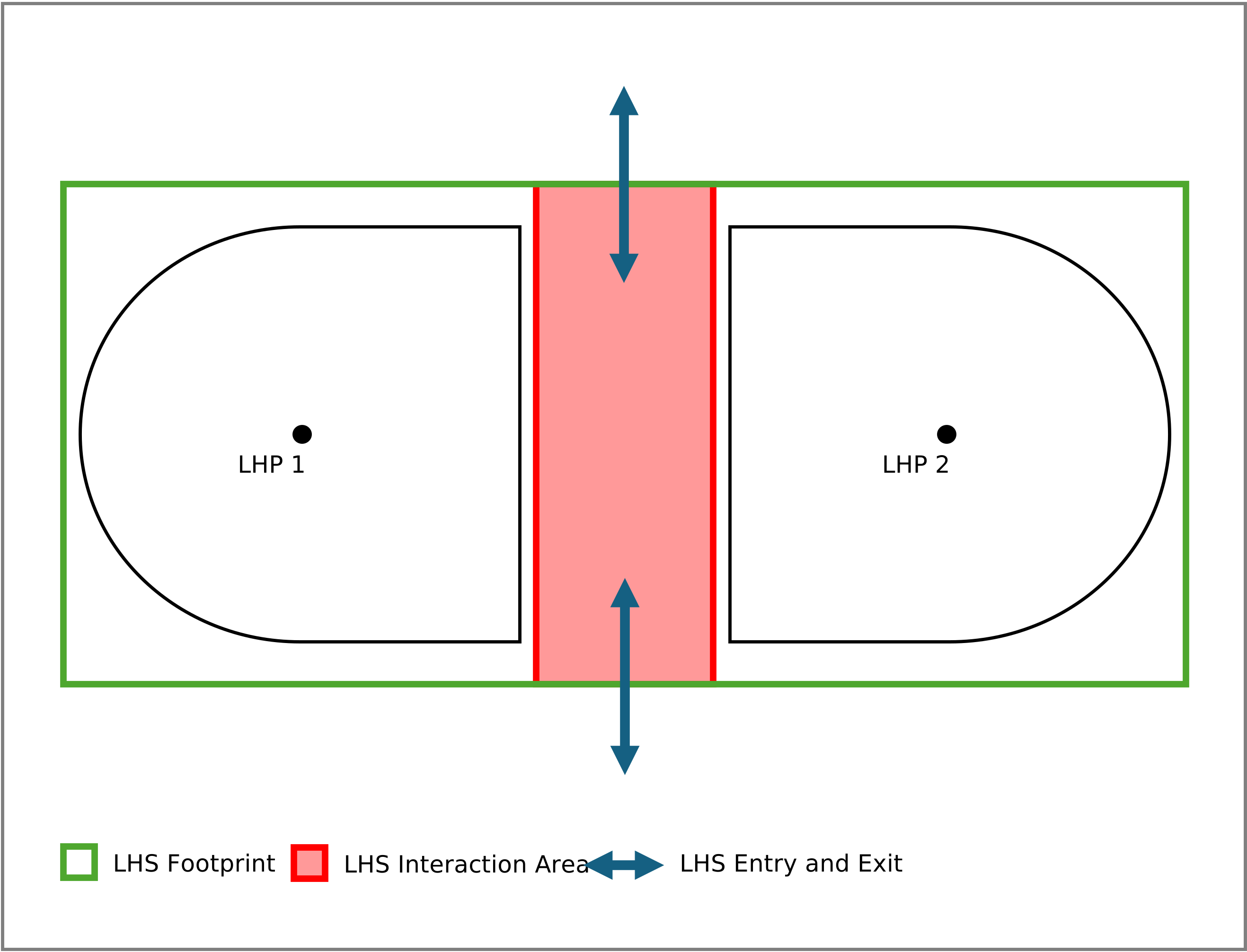
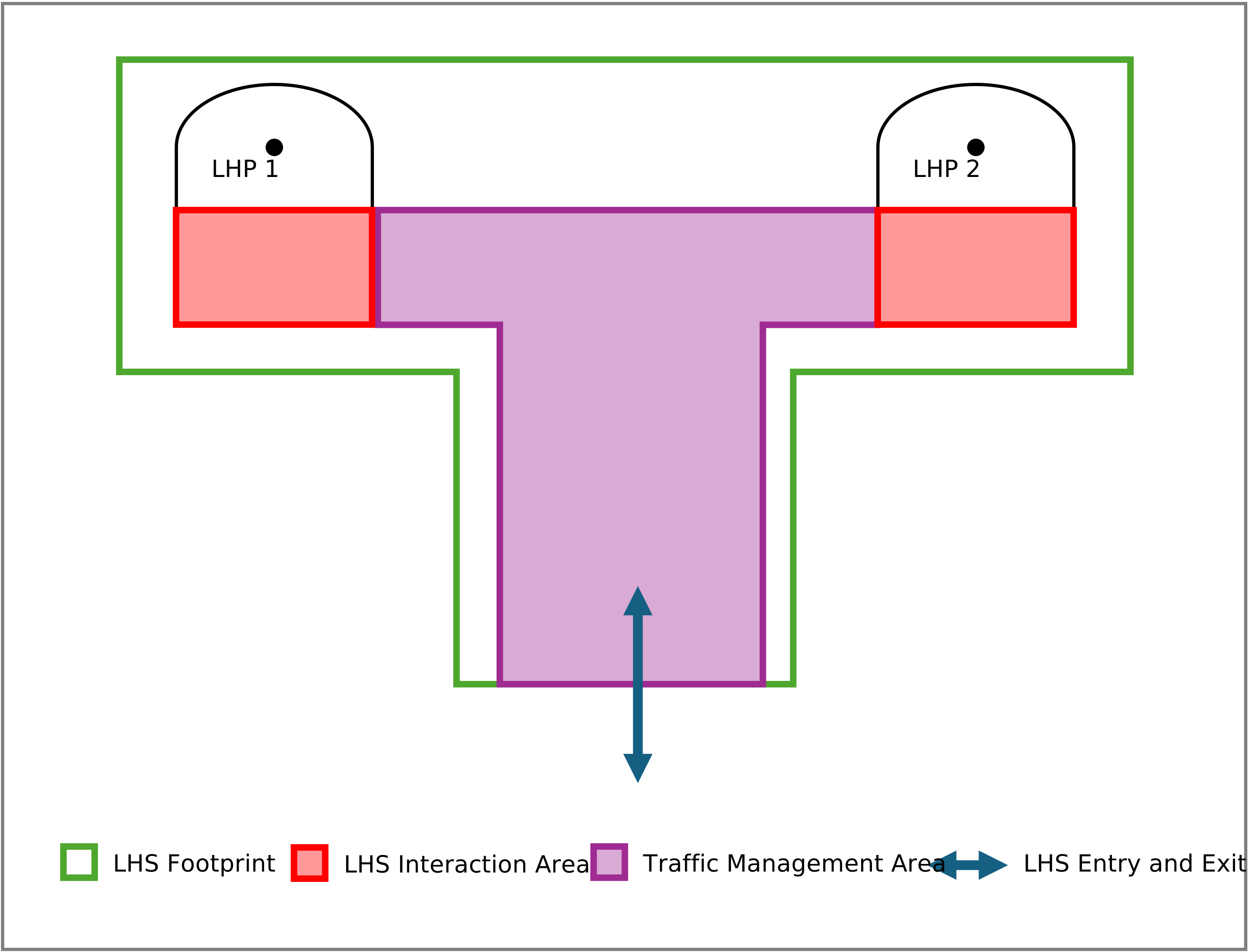
6.1. Requirements for a M2X load handling station
This section describes the requirements for a LHS to use the M2X protocol. It is assumed that a LHS is an active participant that can actively communicate and manage its status. The following points are requirements that a station must fulfill:
-
A LHS is at least represented by a physical area and a software that can handle the status of this area and can communicate with other participants.
-
The software of the LHS manages the process and states described in Section: Load Handling Sequence Diagram (e.g. requestAccess, requestExit, requestLoadTransfer, requestRelease …).
-
Every LHS has a unique ID.
-
Is assigned to a unique position and represents an area in the industrial environment.
-
The LHS shall be represented in a global map in the factory coordinate system with its position and dimensions. M2X uses a right-handed coordinate system (z-axis pointing up).
6.2. Safety considerations for load handling
As already mentioned in the Section: Objective and Scope of M2X there will be no further safety considerations in the protocol. The purpose of the interface is to provide a functional plug-and-play approach. Safety regarding entries and exits can be abstracted/indirectly set via requirements for the accuracy of the position to be taken (see LHS Factsheet .loadHandlingPoints.handoverArea). Considerations in the communication process for mutings at stations are included and can be taken into account.
6.3. Errors
An error should only be reported if it can no longer be solved by the participant (machine or MR) and needs human intervention. If an error occurs the participant reports errors via the errors array. Errors have two levels: WARNING and FATAL. A WARNING is a self-resolving error, e.g., a field violation. A FATAL error needs human intervention. Errors can pass references that help with finding the cause of the error via the errorReferences array. The implementation is described in the relevant JSON schemas. Any error on the station’s side that cannot be resolved results in a "State Failed" report on the request. The decision lies with the station to determine when an error is fatal and must be reported as failed. Errors that can be resolved, and where the station itself possesses this knowledge, require the station to return the "State RUNNING". Every explicit state response to a request with a "Failed State" from an LHS terminates the process. General state messages with an "ERROR" that do not relate to a state response serve merely as information that interaction with the station is not possible. An already triggered response is not affected by this. Only the direct response triggers a termination.
The sequence of an error during load handling is shown in the following diagram:

In the event of an error, the diagram runs as follows. The first decision point is the LHS. As soon as the error occurs here, human interaction is required or the error correction is not part of M2X. If the error occurs at the MR, human interaction is required. The actual process can then be resumed with the requestContinueLoadTransfer if the states can be saved. If the error then occurs, the system queries whether the error occurs in the requestRelease. The process only ends when this request is reached.
An error message can include the following information:
-
headerId,
-
topic,
-
requestId if an error was caused by the request,
-
List of parameters if error was caused by erroneous request parameters. If a request cannot be FINISHED because of external factors (e.g. no load at expected position), the requestId should be referenced.
6.4. Load handling unit
The load handling unit (LHU) is the object that is transferred between the MR and the LHS. The LHU is described in the JSON schema Load handling unit. The following assumptions are made for the definition of the coordinate system of the LHU:
-
M2X uses a right-handed coordinate system (z-axis pointing up).
-
The origin is in the center of the LHU.
-
The X-axis points along the longest side of the LHU.
-
The orientation of an LHU is described relative to the coordinate system in which it is currently located, e.g. on an MR or an LHP of an LHS.
-
The pose of the LHU is always in the local coordinate system, e.g. MR or LHS. With the transfer requestLoadTransfer, the station is informed that the LHU has been transferred to the station with the following orientation in the coordinate system. The FM, MR or another system is responsible for carrying out a transformation to the station’s target coordinate system.
-
The load pose should always have X, Y, Z and theta.
The FM or a comparable system is responsible for creating the necessary transformation chain for transferring an LHU from an MR to an LHS or vice versa. Figure 7 shows an exemplary visualization of different load orientations. In this example a MR is transferring a LHU to a LHS respectively the LHP. The LHU, LHS and MR are oriented in different ways. The handover of the LHU must take place in a different orientation relatively to the LHP. As soon as the orientation has to be taken into account, the transformation must be performed by an appropriate system.
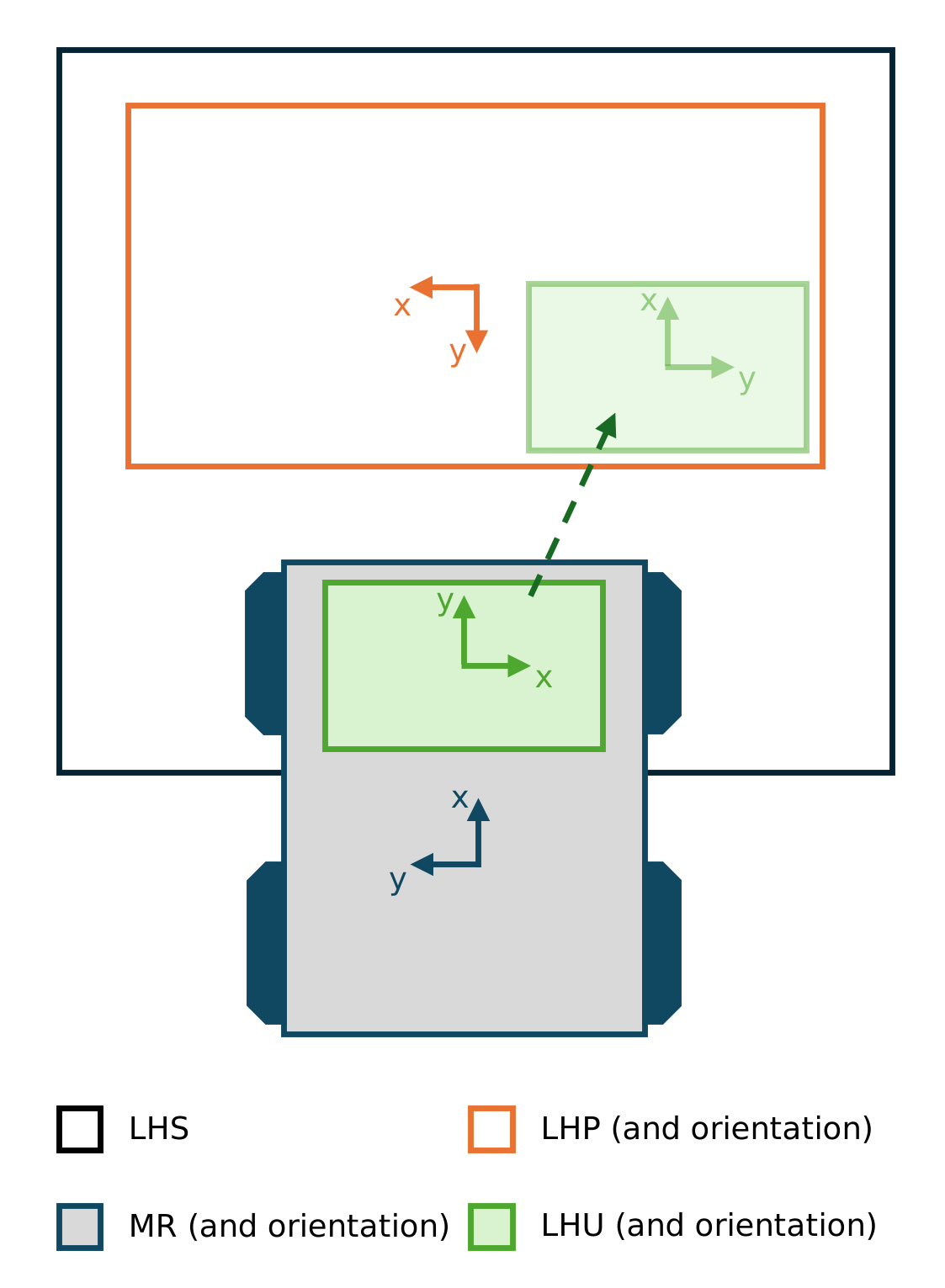
Load handling unit describes which parameters the individual unit has and which action is carried out with it.
| field | data type | description |
|---|---|---|
version |
string |
Version of the M2X protocol [Major].[Minor].[Patch] (e.g. 1.3.2). |
loadHandlingUnit { |
object |
Describes all properties of the load handling unit (LHU). |
loadUnitId |
string |
ID number of the LHU. |
loadHandlingUnitType |
string |
Describes the handling unit, e.g. small load carrier, pallet, etc. Important for matching of the handling capabilities of the unit, e.g the request requestLoadTransfer in the load handling interface of a station or MR. |
weight |
number |
Weight of the load. |
height |
number |
Height of the LHU (outer dimensions). |
width |
number |
Width of the LHU (outer dimensions). |
length |
number |
Length of the LHU (outer dimensions). |
outerPackaging |
string |
Describes the outer packaging of the LHU, e.g. wrapping, strapping etc. |
symmetrical |
boolean |
Describes if the orientation of the LHU is symmetrical. |
} |
6.5. Load handling sequence diagram
The sequence diagram is shown below to describe the load handling process. It is assumed that the MR is the “active” part by leading through the communication sequence with request messages. The station answers accordingly by sending status messages. The communication sequence does not consist of a bidirectional request or state exchange. The states and requests are defined in the corresponding section. Below is a short version of the sequence diagram:
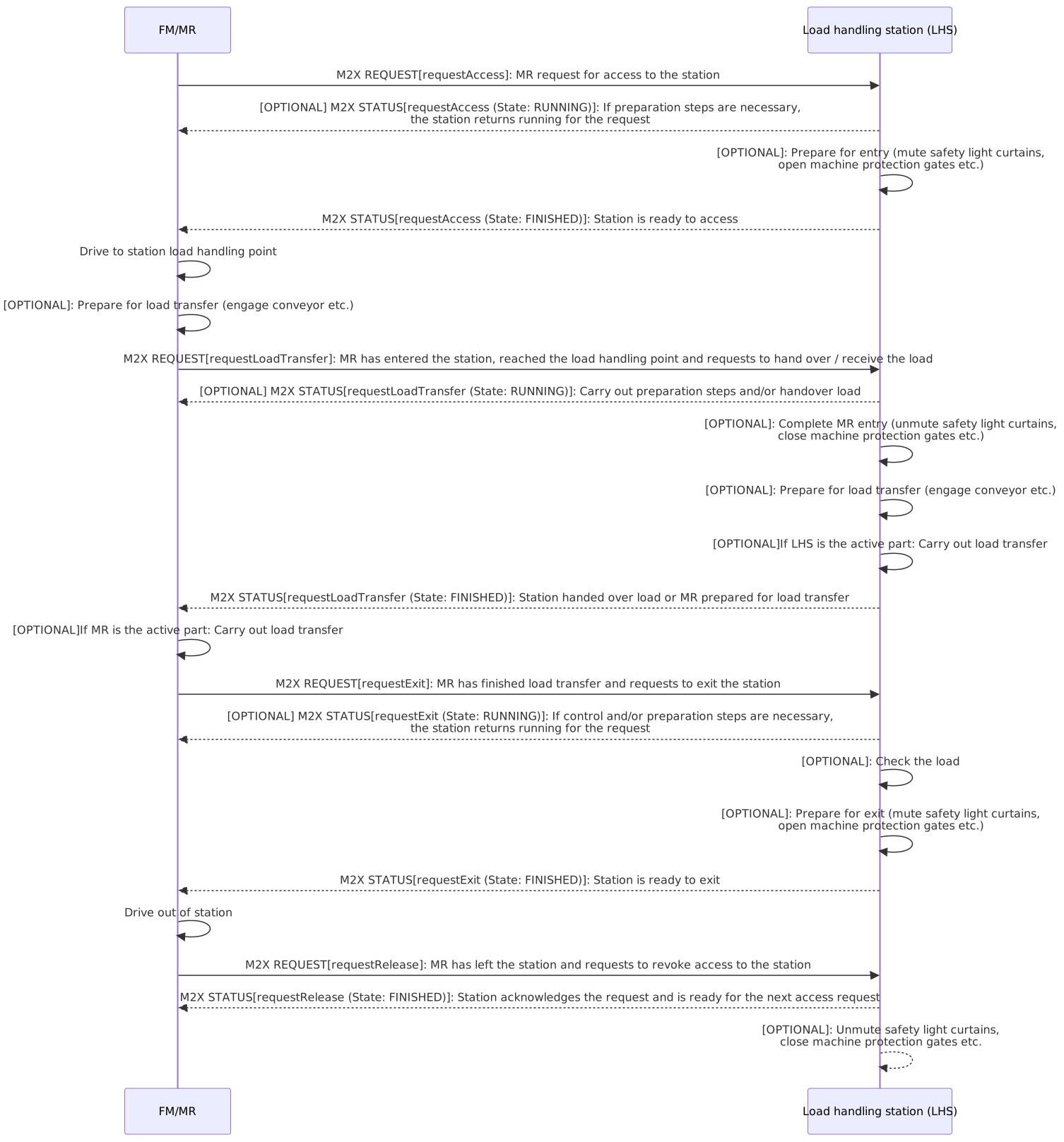
There is also a detailed version of the diagram in the repository, which can be found here: detailed sequence diagram. This version differs in that alternative loops are displayed for each request, which cover errors and busy.
6.6. Topics
The communication with a LHS is done via the following topics:
Type |
Topic schema |
Description |
Factsheet |
lhs/v1.0.0/lhs_example/factsheet |
Used for requesting the factsheet of the LHS. |
Request |
lhs/v1.0.0/lhs_example/request_* |
Used for communication of requests for different load transfer stages: requestAccess, requestLoadTransfer, requestExit, requestRelease, requestFactsheet, requestContinueLoadTransfer, requestCancel |
State |
lhs/v1.0.0/lhs_example/state |
Topic for communicating the current state of the LHS and information about received request messages. |
6.7. Load handling JSON schemas and subtopics
The M2X load handling protocol uses the following JSON schemas and subtopics for the communication between station and MR/FM.
| type | used for | schema (link) |
|---|---|---|
load handling station factsheet |
Self-description of the station, the LHPs and the capabilities. |
|
request |
Communication of the requests for the load transfer. |
|
load handling station state |
Communication of the state of the load handling station itself. |
6.8. Requests
The requests for a load transfer are described below. All requests, associated parameters and their states are predefined in the respective JSON schemas or tables. There can only be one active request per participant with a peripheral device. This applies to every peripheral device and must be actively monitored by FM. Old requests are deleted by requestCancel. Old open requests can be read from the states after failure.
The following requests are required for complete load handling:
-
requestAccess,
-
requestLoadTransfer,
-
requestExit,
-
requestRelease,
-
requestFactsheet,
-
requestContinueLoadTransfer,
-
requestCancel.
6.8.1. Predefined requests
The following two tables describe the predefined requests for the load handling in their parameters and states from RUNNING to FINISHED.
| request | description | parameter |
|---|---|---|
requestAccess |
MR requests the permission to enter the LHP of the station. The activeLoadTransferDevice shall be determined. Disclaimer: In case the LHS is the active load transfer device, the MR needs to prepare the load transfer after a FINISHED requestAccess (see Load transfer sequence diagram). |
loadHandlingSessionId (string), |
requestLoadTransfer |
MR requests to exchange (pick or drop) the load with the station. In case the MR is the active load transfer device the LHS needs to prepare the load transfer and returns a running requestLoadTransfer state. Otherwise the load transfer is FINISHED after the LHS returns a FINISHED requestLoadTransfer state. See Load transfer sequence diagram. |
loadHandlingSessionId (string) |
requestExit |
MR requests the permission to exit the LHP. In case the MR is the active load transfer device the load transfer shall be FINISHED. |
loadHandlingSessionId (string) |
requestRelease |
MR confirms that the station has been left. |
loadHandlingSessionId (string) |
requestFactsheet |
Request factsheet from a station. |
- |
requestContinueLoadTransfer |
MR/Station/FM requests to continue the load transfer. |
loadHandlingSessionId (string) |
requestCancel |
MR/Station/FM requests to cancel the current request. |
loadHandlingSessionId (string) |
| request | RUNNING | PAUSED | FINISHED | FAILED | PENDING |
|---|---|---|---|---|---|
requestAccess |
MR/FM requests to enter the LHP of the station, e.g. the station has to mute the safety light curtains, station opens machine protection gates etc. |
Request is paused e.g., if a safety light curtain is violated. After removing the violation, the process continues. |
Station is ready for load transfer and has carried out all the safety relevant preparatory steps. MR is in the correct position and ready for the load transfer. |
Entry cannot be granted, e.g. failure during the preparation steps. Failed entry requests should correspond with an error. |
Request is waiting to get executed. |
requestLoadTransfer |
- |
- |
LHS handed over load or MR shall be prepared for load transfer |
Load transfer cannot be done. Failed load transfers should correspond with an error. |
- |
requestExit |
MR/FM requests to exit the station, e.g. the station has to mute the safety light curtains. |
Request is paused e.g., if a safety light curtain is violated. After removing the violation, the process continues. |
The station authorizes the exit once all load transfer steps have been FINISHED from the station’s perspective. |
Exit cannot be granted, e.g. failure during load transfer. Failed exit requests should correspond with an error. |
- |
requestRelease |
- |
- |
Station confirms the release of the access and is ready for the next access. |
Release cannot be done. Failed release requests should correspond with an error. |
- |
requestFactsheet |
- |
- |
- |
- |
- |
requestContinueLoadTransfer |
- |
- |
Load transfer is continued. |
Load transfer cannot be continued. Failed continues should be repeated until the sequence is at request requestRelease. After that, the error is ended. |
- |
requestCancel |
- |
- |
Request canceled. |
Request cannot be canceled. |
- |
6.9. Load handling station state
The following section describes the states of the load transfer between the LHS and the MR. The status messages for RUNNING, PAUSED, FINISHED and FAILED are specified here for the requests (requestAccess, requestExit, requestLoadTransfer, requestRelease and requestFactsheet, requestContinueLoadTransfer, requestCancel). For the definitions of the content, see Section: Predefined Requests (LHS). The sequences for the load handling are described in the section load handling sequence diagram. The upcoming table describes the JSON file and its contents. It is assumed that the LHS sends a new state message at least every 30 seconds. A state message has to be sent on every internal state change, e.g. changing an operation state of a request from RUNNING to PAUSED. After sending a new state message, the message timer is reset to 30 seconds. The status depends on the request performed. It can also be queried whether the LHP is connected or not.
| field | data type | description |
|---|---|---|
timestamp |
string |
Timestamp in ISO8601 format (YYYY-MM-DDTHH:mm:ss.sssZ). |
version |
string |
Version of the M2X protocol [Major].[Minor].[Patch] (e.g. 1.3.2). |
serialNumber |
string |
Serial number of the LHS. |
manufacturer |
string |
Manufacturer of the LHS. |
connectionStateLHS |
string |
enum: ONLINE, OFFLINE, CONNECTION_BROKEN. ONLINE: connection between load handling station and broker is active. OFFLINE: connection between load handling station and broker has gone offline in a coordinated way. CONNECTION_BROKEN: The connection between load handling station and broker has unexpectedly ended. |
loadHandlingPointStates [loadHandlingPointState] { |
array |
Describes upcoming and current requests. |
loadHandlingPointId |
string |
Unique identifier of the LHS. |
operationMode |
string |
Current operating mode of the LHS. Enum AUTOMATIC, MANUAL, SERVICE. |
connectionStateLHP |
string |
enum: ONLINE, OFFLINE, CONNECTION_BROKEN. ONLINE: connection between load handling point and broker is active. OFFLINE: connection between load handling point and broker has gone offline in a coordinated way. CONNECTION_BROKEN: The connection between load handling point and broker has unexpectedly ended. |
loadHandlingSessionId |
string |
Unique identifier of the complete request session in a process, e.g. the load handling. |
requestStates [requestState] { |
array |
Array of upcoming and current requests. |
requestId |
string |
Unique requestId. |
requestType |
string |
requestType of the request. |
requestStatus |
string |
Status of the request. |
resultDescription |
string |
Description of the result, e.g., the result of a RFID-read. Errors will be transmitted in errors. |
} |
||
} |
||
errors [error] { |
array |
Array of error-objects. All active errors of the LHS should be in the list. An empty array indicates that the LHS has no active errors. |
errorType |
string |
Type of error. |
requestId |
string |
Id of the request that is caused by or related to the error. |
errorDescription |
string |
Verbose description of error. |
errorLevel |
string |
Description of the error level, which is warning or fatal. WARNING: Station is ready to start (e.g., maintenance cycle expiration warning). FATAL: Station is not in running condition, user intervention required (e.g., laser scanner is contaminated). |
} |
6.10. Load handling station factsheet
A factsheet is provided for the self-description of the load handling station. The factsheet provides basic information about the station. Whoever configures and edits the factsheet must be documented within the project. It describes the station overall as well as the different LHPs and their capabilities. This enables self-configuration in the system context. Each LHS has one factsheet. The factsheet includes at least one LHP. The factsheet is intended both as a human-readable document and for machine processing and is therefore specified as a JSON document. The FM or the MR can request the factsheet from the station at any time. The corresponding request is described in the Section: Predefined Requests (LHS).
Topic for the request: lhs/v1.0.0/stationId/requestFactsheet Topic for the response: lhs/v1.0.0/stationId/factsheet
It is also to be noted that a MR has to request all available factsheets from the stations in order to navigate without colliding or interfere with any station geometry (exclusive managed area of a LHS) of a LHS.
6.10.1. Factsheet JSON structure
The factsheet consists of the JSON-objects listed in the following table.
| field | data type | description |
|---|---|---|
timestamp |
string |
Timestamp in ISO8601 format (YYYY-MM-DDTHH:mm:ss.sssZ). |
version |
string |
Version of the M2X protocol [Major].[Minor].[Patch] (e.g. 1.3.2). |
manufacturer |
string |
Manufacturer of the station. |
serialNumber |
string |
Serial number of the station. |
stationDescriptor |
string |
Describes the LHS for human readability. |
stationGeometry { |
object |
Describes the geometry of the station and its position in the factory coordinate system. |
position { |
object |
Position of the station in the factory-coordinate system. |
x |
number |
The x-position in factory-coordinate system. |
y |
number |
The y-position in factory-coordinate system. |
z |
number |
Z-position in factory-coordinate system. |
} |
||
stationFootprint { |
object |
Describes the footprint and orientation of the station in the factory-coordinate system. |
x-left |
number |
x-left offset of the station. |
x-right |
number |
x-right offset of the station. |
y-left |
number |
y-left offset of the station. |
y-right |
number |
y-right offset of the station. |
theta |
number |
Orientation of the station in the factory coordinate system. |
} |
||
numberLoadHandlingPoints |
number |
Total number of LHPs at the station. |
} |
||
loadHandlingPoints [loadHandlingPoint] { |
array |
These parameters generally specify the class and the capabilities of the loadHandlingPoints. (LHP). |
loadHandlingPointId |
string |
ID number of the LHP. |
stationClass |
string |
Simplified description of station class. |
isLoadHandlingActive |
boolean |
True: LHP can actively (independently) pick and drop goods from or to the MR. |
doubleCycleAbility |
boolean |
True: LHP may be able to carry out double cycles. |
loadHandlingUnitTypes [loadHandlingUnitType] { |
array |
List of all loading units that can be handled at the LHP, for example euro pallet, industrial pallet, GMA-pallet, mesh_box, small_load_carrier, barrel, special_load_carrier. If this parameter does not exist or is empty, the LHP is valid for all load unit types on this station. |
loadHandlingUnitType |
string |
List of all load units. |
handlingAcceleration |
number |
Maximum allowed acceleration for this load-type and –weight. |
parallelSequence |
string |
Describes if the LHP can manage more than one load in the ongoing load transfer. |
} |
||
maxLoadDimensions [maxLoadDimension] { |
array |
Maximum dimensions that can be processed by the LHP. |
length |
number |
Maximum loadable length of the good. |
width |
number |
Maximum loadable width of the good. |
height |
number |
Maximum loadable height of the good. |
mass |
number |
Maximum loadable mass of the good. |
} |
||
positioningAids |
array |
Simplified description of localization type. |
loadHandlingPoint { |
object |
Load handling point (LHP) at which the load can be picked up or dropped off by a mobile robot. The point describes the geometric center of the load for pick-up or delivery. |
pose { |
object |
Pose of the load handling point (LHP) for load handling. |
x |
number |
X-position in factory-coordinate system. |
y |
number |
Y-position in factory-coordinate system. |
z |
number |
Z-position in factory-coordinate system. |
} |
||
*tolerance* { |
object |
Acceptable tolerance for the load handling. |
x-left |
number |
x-left offset of the LHP. |
x-right |
number |
x-right offset of the LHP. |
y-left |
number |
y-left offset of the LHP. |
y-right |
number |
y-right offset of the LHP. |
theta |
number |
Orientation of the LHP in the factory coordinate system. |
} |
||
} |
||
} |
||
loadHandlingRequests [loadHandlingRequest] |
array |
Simplified description of possible load handling actions. |
physicalParameters { |
object |
These parameters specify the basic physical properties of the LHP. |
speedMin |
number |
Minimal controlled continuous speed of the LHP. |
speedMax |
number |
Maximal controlled continuous speed of the LHP. |
accelerationMax |
number |
Maximum possible acceleration for this LHP. |
decelerationLimit |
number |
Maximum possible deceleration for this LHP. |
height |
number |
Height of the LHP. |
width |
number |
Width of the LHP. |
length |
number |
Length of the LHP. |
requiredHandoverHeight |
number |
Required height for handing over the load from MR to LHP. |
pickTime |
number |
Approx. time for picking up the load. |
dropTime |
number |
Approx. time for dropping the load. |
} |
||
restrictedInteraction { |
object |
These parameters specify the restricted interactions with the LHP. |
restrictedVehicles [restrictedVehicle] |
array |
List of all MRs that are not allowed to interact at the LHP. If this parameter does not exist or is empty, the LHP is valid for all MRs on this station. |
restrictedLoads[restrictedLoad] |
array |
List of all loads that are not allowed to interact at the LHP. If this parameter does not exist or is empty, the LHP is valid for all MRs on this station. |
} |
||
communicationType |
string |
Communication type at the load handling station. |
7. Transport order interface
M2X provides communication content and communication processes for the description of transport orders (TOs).
Definition transport order: The TO enables a MR to move goods from a designated source location to a specified destination location. With the TO a MR can perform the following actions: PICK, DROP, VIA. PICK and DROP is the physical transfer of goods. VIA is a PoI that the MR passes through to reach a desired PoI location or to wait there. The TO consists of a collection of objectives that can be extended during the execution of a TO. An objective is a description of an atomic transport step (WHAT and WHERE), e.g. PICK 'Pallet 1' and DROP it at 'storage location 5'. A TO shall contain at least one objective. The example above shows a transport order with two objectives. Orders are defined with the JSON schemas request transport order. State changes to the transport order are communicated via the JSON schema transport order state. A TO has a unique transportOrderId and can be updated using the transportOrderUpdateId of the transport order messages. With isObjectiveListComplete, the end of the TO can be marked.
The following figure shows the context in which layer the M2X protocol is used: The M2X TO interface communicates with the upper layer system. This can be an ERP, a WMS, a manual order generation (for example with a button push at a station) etc.

7.1. Requirements for a M2X transport order
This section describes the requirements for the TO interface in the M2X protocol:
-
The TO shall be composed of objectives.
-
The TO shall have at least one objective.
-
The TO shall only support single carrier transportation.
-
An objective shall be a combination of WHAT and WHERE.
-
The WHERE shall be uniquely identifiable.
-
The WHERE identifier shall be a string identifier.
-
The FM shall allow for the WHERE to be a PoI or group of PoIs.
-
The WHERE identifiers shall be agreed on by the upper layer system and FM.
-
The WHERE shall be resolved to the corresponding resource by the FM.
-
The objective shall support the WHATs PICK, DROP and VIA.
-
The TO shall support delayed decisions (VIA point) for PICK and DROP.
-
The TO shall be closed by the upper layer system, indicated by parameter isObjectiveListComplete in TO update.
-
The FM shall determine when an objective is finished.
-
The upper layer system shall be allowed to attempt to modify the WHAT and WHERE of an objective by TO updates.
-
The upper layer system shall be allowed to attempt to cancel an objective.
-
The FM shall be allowed to reject updates or cancellations to objectives.
-
The upper layer system shall be able to cancel a TO.
-
A canceled TO shall be marked as isCanceled in the transport order state.
-
The request pattern shall be used for the interaction between upper layer system and FM.
-
The FM shall decide whether to accept or decline a request.
-
The LHU shall be defined for the WHAT when PICK action has to be performed.
-
The order shall be marked as finished if the WHAT is transported to the WHERE or an alternative process in the TO receiving system was executed successfully. In case an alternative process was used, a WARNING can be added in the error array, e.g. referencing/reporting the alternative WHERE.
-
Every objective shall have a unique sequenceId that defines the order of execution of all objectives. The sequenceId shall be strictly sequential increasing.
7.2. Errors
If an error occurs within the TO it shall be reported via the errors array. Errors have two levels: WARNING and FATAL. A WARNING is a self-resolving error during TO execution, e.g., an already finished objective. A FATAL error needs human intervention. Errors can pass references that help with finding the cause of the error via the errorReferences array. For TO errors, the predefined enums should be used for the errors types.
7.2.1. Predefined Errors
error type |
error level |
description |
parameter |
OBJECTIVE_ALREADY_FINISHED |
WARNING |
The objective is already finished. The objectiveId was already used beforehand and is not valid for updates anymore. |
objectiveId (string) |
OBJECTIVE_IN_EXECUTION |
WARNING |
The objective is already in execution and cannot be updated anymore. |
objectiveId (string) |
SEQUENCE_ID_NON_CONTIGUOUS |
WARNING |
The sequenceId is non-contiguous. A sequenceId shall be used which links directly to the previous objective or updates an already used sequenceId. |
sequenceId (integer) |
ERROR_DURING_EXECUTION |
WARNING or FATAL |
The objective is not executed correctly. The error can be a WARNING or FATAL. The error can be caused e.g. by the MR or the LHS. It can be caused by an external factor (e.g. no load at expected position). The error can also be caused by an error on FM site e.g. given WHAT and WHERE are unknown. In this case, it is up to the FM whether these changes are allowed; otherwise, an error shall be raised. The selection of the error type is up to the system and can e.g. be forwarded from previous errors. |
action (string), objectiveId (string) |
ERROR_IN_VALIDATION |
WARNING or FATAL |
When validating the data in the TO, inconsistent information can cause an error. The validation of information is not part of M2X, so the decision on the logic throwing an error lies with the FM. The error can e.g. be used to indicate changing resourceIds / priorities during transport order updates or different LHU Ids between a PICK and DROP action. In case this error occurs, it is recommended to cancel the TO with a requestCancel. |
action (string), objectiveId (string) |
7.3. Topics
The communication for TOs is done via the following topics:
type |
topic schema |
description |
Transport order |
order/v1.0.0/fm_or_mr_example/request_transport_order |
Used for describing the order. |
Transport order state |
order/v1.0.0/fm_or_mr_example/request_transport_order_state |
Topic for communicating the current state of the order and information about received order messages. |
7.4. Transport order JSON schemas and subtopics
The M2X TO interface uses the following JSON schemas and subtopics for the communication.
| type | used for | schema (link) |
|---|---|---|
transport_order_state |
JSON Schema for state of a transport order. |
7.5. Requests
The requests that upper layer system executes for creating transport orders are described below. All requests, associated parameters and their states are predefined in the respective JSON schemas or tables. There can only be one active request per participant with a peripheral device. This applies to every peripheral device and must be actively monitored by FM. Old requests are deleted by requestCancel. Old open requests can be read from the states after failure.
The following requests are required for creating and updating transport orders:
-
requestTransportOrder,
-
requestCancel.
7.5.1. Predefined requests
The following two tables describe the predefined TO requests, their parameters, and their states from RUNNING to FINISHED.
request |
description |
parameter |
requestTransportOrder |
Upper layer system creates or updates a transport order. |
|
requestCancel |
MR/Station/FM requests to cancel the current request. A request is canceled if isCanceled (in transport_order_state.schema) is set to true. |
transportOrderId (string), isCanceled (boolean) |
request |
RUNNING |
PAUSED |
FINISHED |
FAILED |
PENDING |
requestTransportOrder |
Upper layer system requests a transport order. |
- |
Transport order is completely and successfully executed. |
Transport order cannot be executed. |
- |
requestCancel |
MR/FM requests to cancel the current request. |
- |
Request canceled. |
Request cannot be canceled. |
- |
requestTransportOrder JSON structure
The TO consists of a collection of objectives that can be extended during the execution of a TO. A TO shall contain at least one objective. An objective is a description of an atomic transport step (WHAT and WHERE), e.g. transport 'Pallet 1' to 'storage location 5'.
Example of the transport order schema:
| field | data type | description |
|---|---|---|
version |
string |
Version of the M2X protocol [Major].[Minor].[Patch] (e.g. 1.3.2). |
timestamp |
string |
Timestamp in ISO8601 format (YYYY-MM-DDTHH:mm:ss.sssZ). The timestamp defines the point in time at which the message was sent. |
transportOrderId |
string |
Transport order (TO) identification. This is to be used to identify multiple transport order messages that belong to the same transport order. The orderId is kept until a new order is received. |
transportOrderUpdateId |
integer |
transportOrderUpdate identification. Is unique per transportOrderId. If an transport order update is rejected, this field is to be passed in the rejection message. '0' is the initial transport order. The transportOrderUpdateId is increased by one for each transport order update for the same transportOrderId. If a gap is identified by the TO receiving system in the sequence of transportOrderUpdateIds, the transport order update with the highest id shall be considered as the valid and. In case an transport order update with a lower or equal transportOrderUpdateId is received from the TO receiving system, the transport order update shall be reject. minimum: 0. |
isObjectiveListComplete |
boolean |
Indicates if the list of objectives is complete. If set to true, the list of objectives is complete and no further objectives or updates will be added to the transport order. default: false. |
resourceId |
string |
Unique identifier of the resource, e.g. ID of the mobile robot, that shall execute the transport order. In case the resourceId is set, the transport order is only valid for the specified resource. If the resourceId is unknown the order receiving system shall decline the transport order. If the resourceId is not set, the transport order is valid for all resources. |
priority |
string |
Priority of the TO. Enum: VERY_LOW, LOW, MEDIUM, HIGH, VERY_HIGH. |
objectives [objective] { |
array |
Defines a location where an action is to be performed by the transporting MR. The array has to contain at least one objective. |
objectiveId |
string |
Unique objective identification. |
sequenceId |
integer |
Number to track the sequence of objectives in an transport order and to simplify order updates. The main purpose is to distinguish between an objective which is passed more than once within one TO (same transportOrderId). The variable sequenceId runs across all objectives of the same transport order and is reset when a new transportOrderId is issued. To update an objective, the sequenceId of the objective to be updated has to be provided. The objective update replaces all following objectives starting from the sequenceId. The sequenceId shall be strictly sequential increasing. minimum: 0. |
destination |
string |
Defines the position (WHERE) a defined action is to be performed. Uniquely point of interest (POI) id (e.g. of an LHP or a LHS). |
action |
string |
Action to be performed at the destination (WHAT). Enum: PICK, DROP, VIA. |
displayName |
string |
Human readable name of the objective. |
loadHandlingUnit |
object |
Description of the load, e.g. id, dimensions, weight etc. For further information see load_handling_unit.schema |
earliestCompletionTime |
string |
Earliest completion time of the objective in ISO8601 format (YYYY-MM-DDTHH:mm:ss.sssZ). Describes when the objective can be FINISHED at the earliest. |
latestCompletionTime |
string |
Latest completion time of the objective in ISO8601 format (YYYY-MM-DDTHH:mm:ss.sssZ). Describes when the objective has to be FINISHED at the latest. |
} |
7.6. Transport order state
The following section describes the states of the TO. It defines the status messages for the transportOrder, their updates and the end of the TO.
7.6.1. Transport order state JSON structure
The TO state consists of the JSON-objects listed in the following table.
| field | data type | description |
|---|---|---|
version |
string |
Version of the M2X protocol [Major].[Minor].[Patch] (e.g. 1.3.2). |
timestamp |
string |
Timestamp in ISO8601 Format (YYYY-MM-DDTHH:mm:ss.sssZ). The timestamp defines the point in time at which the message was sent. |
transportOrderId |
string |
Unique transport order identification of the current transport order or the previous finished transport order. The transportOrderId is kept until a new transport order is received. Empty string (\"\") if no previous transportOrderId is available. |
transportOrderUpdateId |
integer |
Transport order update identification to identify that an transport order update has been accepted by the FM or MR. \"0\" if no previous transportOrderUpdateId is available. |
lastObjectiveId |
string |
lastObjectiveId of last reached objective or, if MR is currently on an objective, current objective (e.g., \"objective\"). Empty string (\"\") if no lastObjectiveId is available. |
resourceId |
string |
Unique identifier of the resource, e.g. ID of the mobile robot, that shall execute the transport order. In case the resourceId is set, the transport order is only valid for the specified resource. If the resourceId is unknown the order receiving system shall decline the transport order. If the resourceId is not set, the transport order is valid for all resources. |
priority |
string |
Priority of the TO. Enum: VERY_LOW, LOW, MEDIUM, HIGH, VERY_HIGH. |
isCanceled |
boolean |
Indicates whether the transport order is canceled or not. If true, the transport order is canceled and no further objectives are to be executed. |
objectiveStates [objectiveState] { |
array |
Array of objectiveStates, that need to be traversed for fulfilling the TO. Empty list if idle. |
objectiveId |
string |
Unique objective identification. |
sequenceId |
integer |
Number to track the sequence of objectives in an transport order and to simplify order updates. The main purpose is to distinguish between an objective which is passed more than once within one TO (same transportOrderId). The variable sequenceId runs across all objectives of the same transport order and is reset when a new transportOrderId is issued. To update an objective, the sequenceId of the objective to be updated has to be provided. The objective update replaces all following objectives starting from the sequenceId. The sequenceId shall be strictly sequential increasing. |
destination |
string |
Defines the position (WHERE) a defined action is to be performed. Uniquely point of interest (POI) id (e.g. of an LHP or a LHS). |
action |
string |
Action to be performed at the destination (WHAT). Enum: PICK, DROP, VIA. |
displayName |
string |
Human readable name of the objective. |
loadHandlingUnit |
object |
Description of the load, e.g. id, dimensions, weight etc. For further information see load_handling_unit.schema |
estimatedCompletionTime |
string |
Estimated completion time of the objective in ISO8601 format (YYYY-MM-DDTHH:mm:ss.sssZ). |
} |
||
requestStates { |
array |
Array of upcoming and current requests. |
requestId |
string |
Id of a request to be referred to in this state. |
requestType |
string |
requestType of the request. Optional: Only for informational or visualization purposes. |
requestStatus |
string |
State of the request. Enum: RUNNING, PAUSED, FINISHED, FAILED, PENDING. |
resultDescription |
string |
Description of the result. Errors will be transmitted in errors. |
} |
||
errors [error] { |
array |
Array of error-objects. All active errors of the order should be in the list. An empty array indicates that the LHS has no active errors. |
errorType |
string |
Type of error. Enum: OBJECTIVE_ALREADY_FINISHED, OBJECTIVE_IN_EXECUTION, SEQUENCE_ID_NON_CONTIGUOUS, ERROR_DURING_EXECUTION. |
errorReferences [errorReference] { |
array |
Object that holds the error reference to requests as key-value pairs. |
referenceKey |
string |
References cause of the error (e.g. objectiveId and sequenceId of the TO). |
referenceValue |
string |
References the value, which belongs to the reference key. |
} |
||
errorDescription |
string |
Verbose description of error. |
errorLevel |
string |
Description of the error level, which is WARNING or FATAL. |
} |
8. Door interface
M2X provides communication content and communication processes for the the transit of doors. In the M2X context, the generic term door includes the variants/components barrier, gate, portal, hatch, exit point, and others. Any structural element that allows passage through a room partition when opened is referred to as a door.
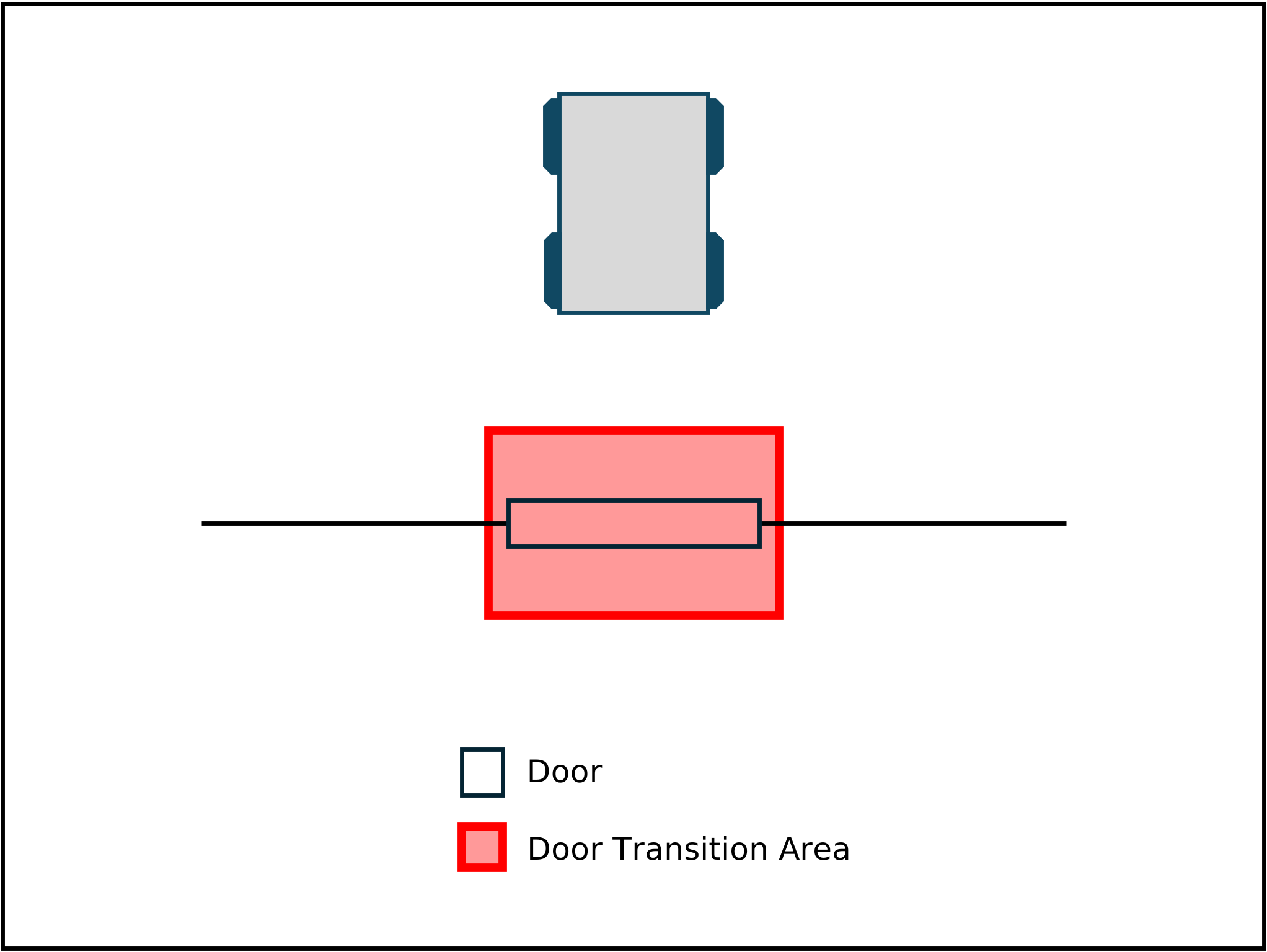
Definition of a M2X door: A door is a self managed device that has an own factsheet. In front of the door is a transition area that is managed by the door itself. Once a MR is in front of the door, it can request to transit the door. Other areas around or behind the door are managed by the FM. The transition area is specified as a polygon in the factsheet of the door under doorFootprint. The following figure shows an example of a door in the M2X context:
A door that stays open all the time is called a passive door. A passive door is an M2X peripheral that does not require explicit state requests to reveal its condition. Instead, it publishes its current status (e.g. OPEN, CLOSED) continuously or upon change through the state channel. Passive doors typically expose no active requests. In the minimal case, their request parameter contains only a requestFactsheet.
8.1. Requirements for a M2X door interface
This section describes the requirements for the door interface in the M2X protocol:
-
Doors and all subtypes are considered in one interface.
-
An airlock door is represented by individual doors. The doors are managed by a logic/program which covers the behavior and sequence of the doors. This logic is not part of M2X.
-
Each door requires a bounding box, i.e., the physical space it needs to open/close. This area is called transition area.
-
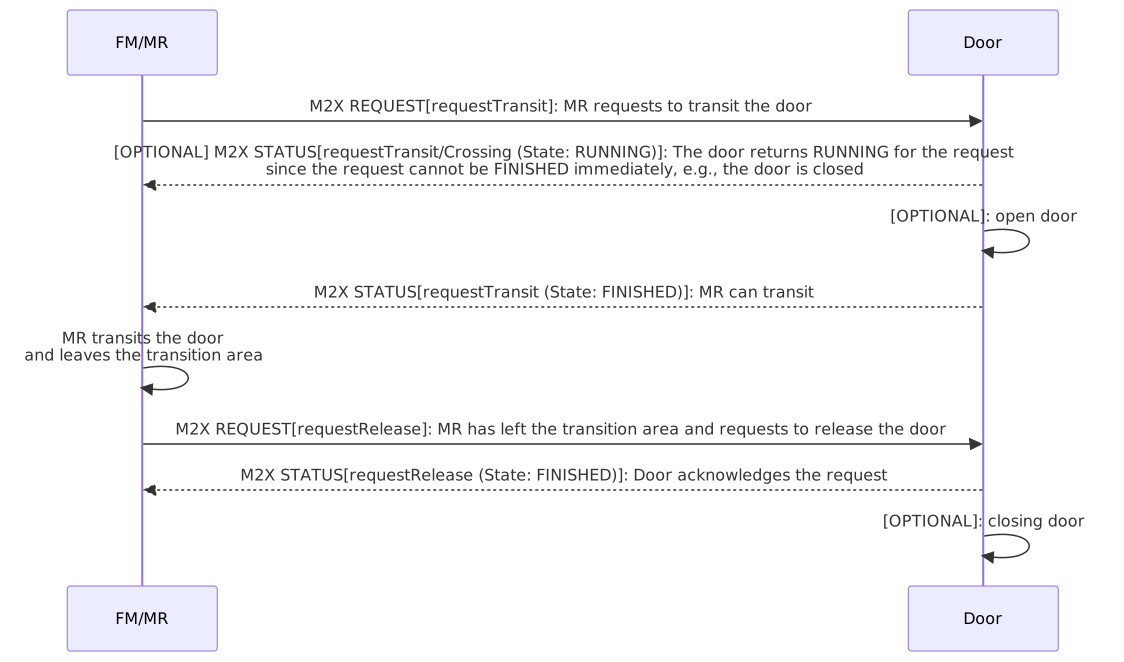
For crossing a door, the MR shall request the transit of the door. After the MR has passed the door, it shall send a requestRelease to the door.
-
The transition area shall not be entered until the requestTransit is FINISHED. After the MR left the transition area it sends a requestRelease.
-
Fire doors can be addressed with M2X but are treated like normal doors. All safety/fire protection details are not part of M2X.
-
The door logic is described using an enum (open, closed, closing, opening) in the doors factsheet. This enum is only for visualization purposes.
-
A door shall be able to stay open through multiple requestTransits, closing earliest when all requestRelease have been processed.
8.2. Errors
If an error occurs within the door transit it shall be reported via the errors array. Errors have two levels: WARNING and FATAL. A WARNING is a self-resolving error during transit, e.g., a field violation at the door. A FATAL error needs human intervention. Errors can pass references that help with finding the cause of the error via the errorReferences array. For door errors, the predefined enums should be used for the errors types.
8.2.1. Predefined Errors
error type |
error level |
description |
parameter |
ERROR_DURING_EXECUTION |
WARNING or FATAL |
The door transit is not executed correctly. The error can be a WARNING or FATAL. The error can be caused e.g. by the MR or the door. It can be caused by an external factor (e.g. a blocked transition area). The error can also be caused by an error on FM site e.g. given parameters are unknown. In this case, it is up to the FM whether these changes are allowed; otherwise, an error shall be raised. The selection of the error type is up to the system and can e.g. be forwarded from previous errors. |
objectiveId (string) |
8.3. Door sequence diagram
8.4. Topics
The communication with a door is done via the following topics:
Type |
Topic schema |
Description |
Factsheet |
door/v1.0.0/door_example/factsheet |
Used for requesting the factsheet of the door. |
Request |
door/v1.0.0/door_example/request_* |
Used for communication of requests for transit the door: requestTransit, requestRelease, requestFactsheet, requestCancel |
State |
door/v1.0.0/door_example/state |
Topic for communicating the current state of the door and information about received request messages. |
8.5. Door JSON schemas and subtopics
The M2X door interface uses the following JSON schemas and subtopics for the communication between door and MR/FM.
| type | used for | schema (link) |
|---|---|---|
door factsheet |
Self-description of the door. |
|
request |
Communication of the requests for the transit. |
|
door state |
Communication of the state of the door itself. |
8.6. Requests
The requests for door transit are described below. All requests, associated parameters and their states are predefined in the respective JSON schemas or tables. There can only be one active request per participant with a peripheral device. This applies to every peripheral device and must be actively monitored by FM. Old requests are deleted by requestCancel. Old open requests can be read from the states after failure. Exception: A door may remain open across multiple requestTransit interactions.
The following requests are required for the door interface:
-
requestTransit,
-
requestRelease,
-
requestFactsheet,
-
requestCancel.
8.6.1. Predefined requests
The following two tables describe the predefined requests for the door interface, their parameters, and their states from RUNNING to FINISHED.
request |
description |
parameter |
requestTransit |
The MR is in front of the transition area of the door and requests to transit the door. The transit is also part of the request. |
doorId (string), doorStatus (string) |
requestRelease |
The MR has passed the door and releases the transit request. The door can send the state finished right after the request, as it is irrelevant whether the door closes or remains open for the next MR. |
doorId (string) |
requestFactsheet |
Request factsheet from a door. |
- |
requestCancel |
MR/FM requests to cancel the current request. |
doorId (string) |
request |
RUNNING |
PAUSED |
FINISHED |
FAILED |
PENDING |
requestTransit |
MR is in front of the transition area of the door and requests to transit the door. If the door is currently not open it starts to open itself. |
- |
Door is open and MR can transit/cross it. |
Door cannot be opened or MR is not allowed to transit/cross it. A failed request shall correspond with an error. |
Request is waiting to get executed. |
requestRelease |
MR/FM requests to release the occupancy of the door. MR has left the door transition area. |
- |
Door confirms the release of the access and is ready for the next request. |
Release cannot be done. Failed release requests shall correspond with an error. |
- |
requestFactsheet |
- |
- |
- |
- |
- |
requestCancel |
MR/FM requests to cancel the current request. |
- |
Request canceled. |
Request cannot be canceled. |
- |
8.7. Door state
The following section describes the states of the door. You can find the JSON schema for the door state here: Door state.
8.7.1. Door state JSON structure
The door state consists of the JSON-objects listed in the following table.
field |
data type |
description |
timestamp |
string |
Timestamp in ISO8601 format (YYYY-MM-DDTHH:mm:ss.sssZ). The timestamp defines the point in time at which the message was sent. |
version |
string |
Version of the M2X protocol [Major].[Minor].[Patch] (e.g. 1.3.2). |
serialNumber |
string |
Serial number of the door. |
manufacturer |
string |
Manufacturer of the door. |
connectionState |
string |
enum: ONLINE, OFFLINE, CONNECTION_BROKEN. ONLINE: connection between door and broker is active. OFFLINE: connection between door and broker has gone offline in a coordinated way. CONNECTION_BROKEN: The connection between door and broker has unexpectedly ended. |
doorState { |
object |
The door state contains the current status of the door, including its requests. |
doorId |
string |
Unique identifier of the individual door. |
doorStatus |
string |
Current status of the door. Enum: OPEN, CLOSED, OPENING, CLOSING. |
requestStates |
array |
Array of upcoming and current requests. |
requestId |
string |
Id of a request to be referred to in this state. |
requestType |
string |
requestType of the request. Optional: Only for informational or visualization purposes. |
requestStatus |
string |
State of the request. Enum: RUNNING, PAUSED, FINISHED, FAILED, PENDING. |
resultDescription |
string |
Description of the result. Errors will be transmitted in errors.. |
} |
||
errors [error] { |
array |
Array of error-objects. All active errors of the door should be in the list. An empty array indicates that the door has no active errors. |
errorType |
string |
Type of error. |
requestId |
string |
Id of the request that is caused or related to the error. |
errorDescription |
string |
Verbose description of error. |
errorLevel |
string |
Description of the error level, which is warning or fatal. WARNING: Door is ready to start (e.g., maintenance cycle expiration warning). FATAL: Door is not in running condition, user intervention required. |
} |
8.8. Door factsheet
A factsheet is provided for the self-description of the door. It describes the door overall as well as its capabilities. You can find the factsheet JSON schema here: Door factsheet
8.8.1. Factsheet JSON structure
The factsheet consists of the JSON-objects listed in the following table.
field |
data type |
description |
timestamp |
string |
Timestamp in ISO8601 format (YYYY-MM-DDTHH:mm:ss.sssZ). The timestamp defines the point in time at which the message was sent. |
version |
string |
Version of the M2X protocol [Major].[Minor].[Patch] (e.g. 1.3.2). |
manufacturer |
string |
Manufacturer of the door. |
serialNumber |
string |
Serial number of the door. |
doorGeometry { |
object |
These parameters generally specify the geometry of the door. |
position |
array |
Position of the door in the factory coordinate system. |
x |
number |
The x-position in factory-coordinate system. |
y |
number |
The y-position in factory-coordinate system. |
z |
number |
The z-position in factory-coordinate system. |
doorFootprint |
array |
Describes the footprint of the door as a polygon in the factory coordinate system. The footprint includes the transition area of the door. |
x |
number |
The x-position in factory-coordinate system. |
y |
number |
The y-position in factory-coordinate system. |
z |
number |
The z-position in factory-coordinate system. |
communicationType |
string |
Communication type at the door. |
_restrictedVehiclesTypes_ |
array |
List of all MRs types that are not allowed to interact with the door. If this parameter does not exist or is empty, the door is valid for all MRs. |
doorDescriptor |
string |
Describes the type of the door for human readability. |
} |
||
doorRequests [doorRequest] |
array |
Simplified description of possible door requests. Enum: requestTransit, requestRelease, requestFactsheet, requestCancel. |
door { |
object |
These parameters generally specify the door. |
doorId |
string |
ID number of the door. |
clearanceWidth |
number |
Width of the door clearance in the door. |
clearanceHeight |
number |
Height of the door clearance in the door. |
} |
9. Signaling device interface
M2X provides communication content and communication processes for a signaling device interface. In the M2X context, the generic term signaling device includes the variants/components traffic light, signal light, stop light and others.
Definition of a M2X signaling device: A signaling device is a self managed device that has an own factsheet. The device can describe itself and its properties. For example, for traffic lights that it can show red, yellow and green lights.
9.1. Requirements for a M2X signaling device interface
This section describes the requirements for the signaling device interface in the M2X protocol:
-
A signaling device shall be a physical or virtual entity.
-
The device shall have a distinct signal state.
-
The device shall provide a list of all possible requestable signals and a list of all possible signals.
-
The list of requestable signals shall be a subset of all possible signals.
-
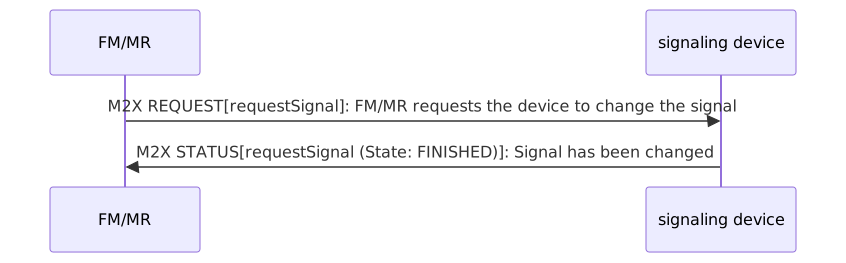
A change of the signal shall be requested with requestSignal (from the list with requestable signals).
-
The device should provide a list of upcoming signals; this list may also be empty.
9.2. Errors
If an error occurs within the signaling device it shall be reported via the errors array. Errors have two levels: WARNING and FATAL. A WARNING is a self-resolving error during signal change, e.g., a field violation at the signaling device. A FATAL error needs human intervention. Errors can pass references that help with finding the cause of the error via the errorReferences array. For signaling device errors, the predefined enums should be used for the errors types.
9.3. Signaling device sequence diagram
9.4. Topics
The communication with a signaling device is done via the following topics:
Type |
Topic schema |
Description |
Factsheet |
signal_light/v1.0.0/signaling_device_example/factsheet |
Used for requesting the factsheet of the signaling device. |
Request |
signal_light/v1.0.0/signaling_device_example/request_* |
Used for communication of requests for the signaling device: requestSignal, requestFactsheet, requestCancel |
State |
signal_light/v1.0.0/signaling_device_example/state |
Topic for communicating the current state of the signaling device and information about received request messages. |
9.5. Signaling device JSON schemas and subtopics
The M2X signaling device interface uses the following JSON schemas and subtopics for the communication between station and MR/FM.
type |
used for |
schema (link) |
signaling device factsheet |
Self-description of the signaling device. |
|
request |
Communication of the requests for the signaling device. |
|
signaling device state |
Communication of the state of the signaling device itself. |
9.6. Requests
The requests for signaling devices are described below. All requests, associated parameters and their states are predefined in the respective JSON schemas or tables. There can only be one active request per participant with a peripheral device. This applies to every peripheral device and must be actively monitored by FM. Old requests are deleted by requestCancel. Old open requests can be read from the states after failure. The following requests are required for creating and updating signaling devices:
-
requestSignal,
-
requestFactsheet,
-
requestCancel.
9.6.1. Predefined requests
The following two tables describe the predefined requests for the signaling device interface, their parameters, and their states from RUNNING to FINISHED.
request |
description |
parameter |
requestSignal |
Request to change the state of a signaling device. |
signalId (string) |
requestFactsheet |
Request factsheet from a signaling device. |
- |
requestCancel |
MR/FM requests to cancel the current request. |
signalId (string) |
request |
RUNNING |
PAUSED |
FINISHED |
FAILED |
PENDING |
requestSignal |
Signaling device changes signal. |
- |
Signal changed successfully. |
Signal cannot be changed. A failed request shall correspond with an error. |
Request is waiting to get executed. |
requestFactsheet |
- |
- |
- |
- |
- |
requestCancel |
MR/FM requests to cancel the current request. |
- |
Request canceled. |
Request cannot be canceled. |
- |
9.7. Signaling device state
The following section describes the states of the signaling device. You can find the JSON schema for the signaling device state here: Signaling device state.
9.7.1. Signaling device state JSON structure
The signaling device state consists of the JSON-objects listed in the following table.
field |
data type |
description |
timestamp |
string |
Timestamp in ISO8601 format (YYYY-MM-DDTHH:mm:ss.sssZ). The timestamp defines the point in time at which the message was sent. |
version |
string |
Version of the M2X protocol [Major].[Minor].[Patch] (e.g. 1.3.2). |
serialNumber |
string |
Serial number of the signaling device. |
manufacturer |
string |
Manufacturer of the signaling device. |
connectionState |
string |
enum: ONLINE, OFFLINE, CONNECTION_BROKEN. ONLINE: connection between signaling device and broker is active. OFFLINE: connection between signaling device and broker has gone offline in a coordinated way. CONNECTION_BROKEN: The connection between signaling device and broker has unexpectedly ended. |
signalingDeviceState { |
object |
The signaling device state contains the current status of the signaling device, including its requests. |
signalingDeviceId |
string |
Unique identifier of the individual signaling device. |
globalSignal |
object |
Current signal state for all participants who have not requested individual signal. |
signalId |
string |
Unique identifier of the signal. |
descriptor |
string |
Description of the signal. |
individualSignals |
array |
Requested individual signals. If a request is FINISHED, the individual signal is listed here as long as it is active. If a signal is not listed for a requestId, the globalSignal applies. |
requestId |
string |
Id of a request to be referred to in this state. |
signalId |
string |
Unique identifier of the signal. |
descriptor |
string |
Description of the signal. |
plannedSignals |
array |
Ordered list of planned signals. Be aware that planned signals are not guaranteed to be executed. |
signalId |
string |
Unique identifier of the signal. |
plannedStart |
string |
Timestamp in ISO8601 Format (YYYY-MM-DDTHH:mm:ss.sssZ). The timestamp defines the point in time when the signal is planned to start. |
plannedEnd |
string |
Timestamp in ISO8601 Format (YYYY-MM-DDTHH:mm:ss.sssZ). The timestamp defines the point in time until the signal is planned to be executed. |
requestStates |
array |
Array of upcoming and current requests. |
requestId |
string |
Id of a request to be referred to in this state. |
requestedSignal |
object |
Signal associated with the request. |
signalId |
string |
Unique identifier of the signal. |
descriptor |
string |
Description of the signal. |
requestType |
string |
requestType of the request. Optional: Only for informational or visualization purposes. |
requestStatus |
string |
State of the request. Enum: PENDING, RUNNING, PAUSED, FINISHED, FAILED. |
resultDescription |
string |
Description of the result. Errors will be transmitted in errors. |
errors [error] { |
array |
Array of error-objects. All active errors of the signaling device should be in the list. An empty array indicates that the signaling device has no active errors. |
errorType |
string |
Type of error. |
requestId |
string |
Id of the request that is caused or related to the error. |
errorDescription |
string |
Verbose description of error. |
errorLevel |
string |
Description of the error level, which is warning or fatal. WARNING: signaling device is ready to start (e.g., maintenance cycle expiration warning). FATAL: signaling device is not in running condition, user intervention required. |
} |
||
} |
9.8. Signaling device factsheet
A factsheet is provided for the self-description of the signaling device. It describes the signaling device overall as well as its capabilities. You can find the factsheet JSON schema here: Signaling device factsheet.
9.8.1. Factsheet JSON structure
The factsheet consists of the JSON-objects listed in the following table.
field |
data type |
description |
timestamp |
string |
Timestamp in ISO8601 format (YYYY-MM-DDTHH:mm:ss.sssZ). The timestamp defines the point in time at which the message was sent. |
version |
string |
Version of the M2X protocol [Major].[Minor].[Patch] (e.g. 1.3.2). |
manufacturer |
string |
Manufacturer of the signaling device. |
serialNumber |
string |
Serial number of the signaling device. |
signalingDeviceDescriptor |
string |
Describes the signaling device for human readability, e. g. traffic light, flashing light. |
position { |
object |
Position of the signaling device in the factory coordinate system. |
x |
number |
The x-position in factory-coordinate system. |
y |
number |
The y-position in factory-coordinate system. |
z |
number |
The z-position in factory-coordinate system. |
} |
||
signalingDeviceRequests [signalingDeviceRequest] |
array |
Simplified description of possible signaling device requests. Enum: requestSignal, requestFactsheet, requestCancel. |
communicationType |
string |
Used Communication type at the signaling device. |
signals { |
array |
List of signals. |
signalId |
string |
Unique identifier of the signal. |
isRequestable |
boolean |
Indicates if the signal can be requested. |
descriptor |
string |
Description of the signal. |
} |
10. Elevator interface
M2X provides communication content and communication processes for an elevator interface. In the M2X context, an elevator or lift is a platform that can transport MRs and/or humans between different floors/levels in a building or factory.
Definition of a M2X elevator: An elevator is a self managed device that has an own factsheet. The MR has to ensure that it is positioned correctly inside the elevator platform before requesting to change the floor. The correct position is defined as a polygon in the factsheet of the elevator under elevatorFootprint. If elevator doors only open at certain levels with authorization, this must be taken into account for M2X so that the corresponding levels are not approached.
Also the elevator definition in ISO 8100-20:2018, 3.17 remains valid: lifting appliance intended to transport persons with or without goods or freight by means of a power-operated load-carrying unit (LCU) (3.18) that is guided by a fixed guiding system from one landing (3.16) to another, at an angle of more than 75° to the horizontal.
10.1. Requirements for a M2X elevator interface
This section describes the requirements for the elevator interface in the M2X protocol:
-
An elevator can consist of several elevators (elevator group), in which case MR must dynamically move to the correct one.
-
The factsheet describes which/how many doors of the elevator exist, and which floors can be reached.
-
MR requests the floor and gives a release when it is outside (the door is included in the logic).
-
The request for the target floor is specified with a requestChangeFloor.
-
Which door of the elevator shall be opened is determined by the floor selection (e.g. floor 3, left door).
-
The capacity of the elevator shall be managed by the FM, also the FM is aware of the used maps of the MRs and can therefore know what MR is able to use the elevator.
-
The FM/MR shall be able to ensure for the access and exit of the elevator that the contour of the MR is suitable and completely inside the elevator.
10.2. Errors
If an error occurs within the elevator it shall be reported via the errors array. Errors have two levels: WARNING and FATAL. A WARNING is a self-resolving error during elevator entry, e.g., a field violation. A FATAL error needs human intervention. Errors can pass references that help with finding the cause of the error via the errorReferences array. For elevator errors, the predefined enums should be used for the errors types.
10.2.1. Predefined Errors
error type |
error level |
description |
parameter |
ERROR_DURING_EXECUTION |
WARNING or FATAL |
The elevator floor change is not executed correctly. The error can be a WARNING or FATAL. The error can be caused e.g. by the MR or the elevator. It can be caused by an external factor (e.g. a blocked elevator, wrong floor). The error can also be caused by an error on FM site e.g. given parameters are unknown. In this case, it is up to the FM whether these changes are allowed; otherwise, an error shall be raised. The selection of the error type is up to the system and can e.g. be forwarded from previous errors. |
requestId (string) |
10.3. Elevator sequence diagram
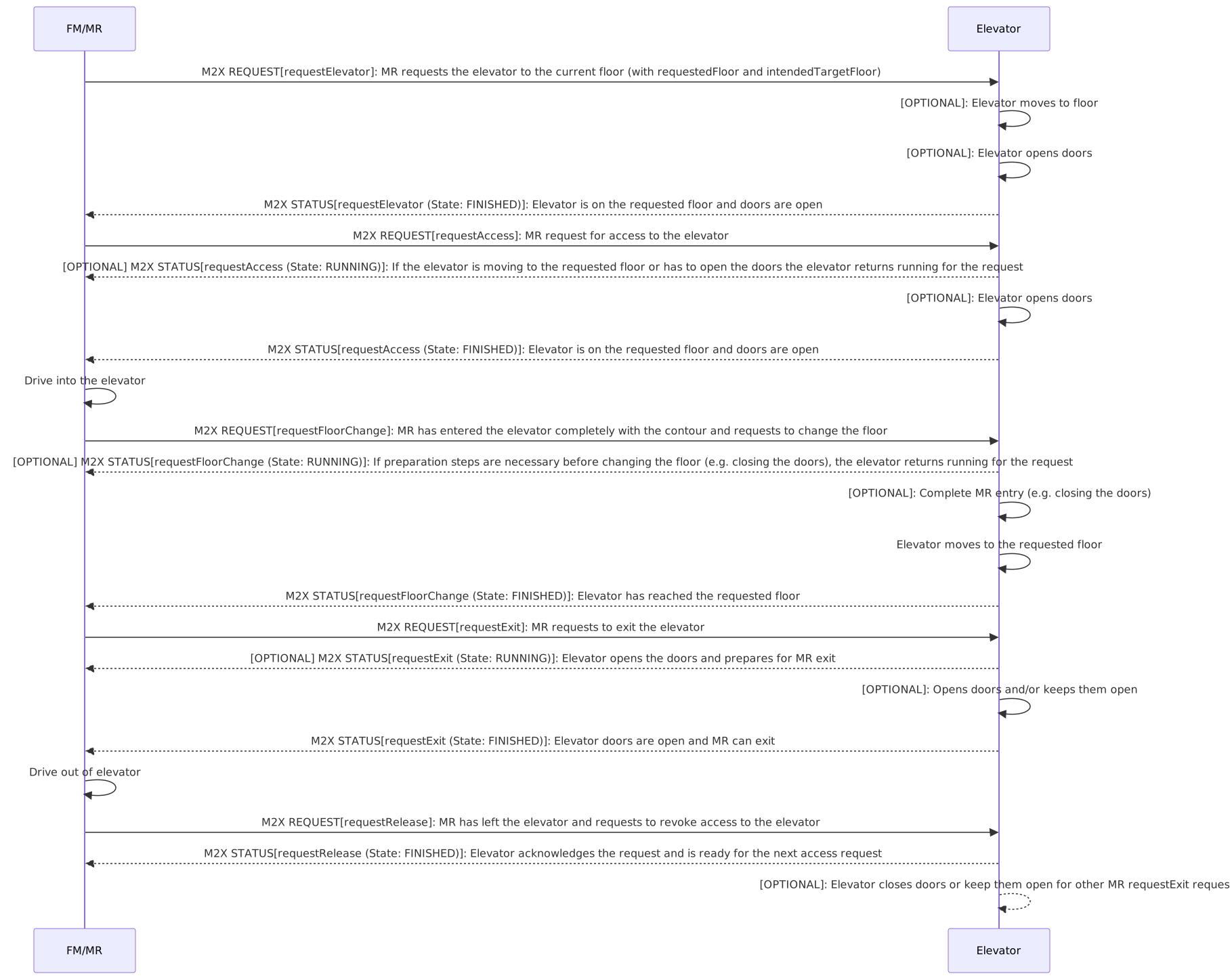
10.4. Topics
The communication with an elevator is done via the following topics:
Type |
Topic schema |
Description |
Factsheet |
elevator/v1.0.0/elevator_example/factsheet |
Used for requesting the factsheet of the elevator. |
Request |
elevator/v1.0.0/elevator_example/request_* |
Used for communication of requests for elevator transit: requestElevator, requestAccess, requestChangeFloor, requestExit, requestRelease, requestManualMode, requestFactsheet, requestCancel |
State |
elevator/v1.0.0/elevator_example/state |
Topic for communicating the current state of the elevator and information about received request messages. |
10.5. Elevator JSON schemas and subtopics
The M2X elevator interface uses the following JSON schemas and subtopics for the communication between elevator and MR/FM.
| type | used for | schema (link) |
|---|---|---|
elevator factsheet |
Self-description of the elevator. |
|
request |
Communication of the requests for the transit. |
|
elevator state |
Communication of the state of the elevator itself. |
10.6. Requests
The requests for an elevator are described below. All requests, associated parameters and their states are predefined in the respective JSON schemas or tables. There can only be one active request per participant with a peripheral device. This applies to every peripheral device and must be actively monitored by FM. Old requests are deleted by requestCancel. Old open requests can be read from the states after failure.
The following requests are required for the elevator interface:
-
requestElevator,
-
requestAccess,
-
requestChangeFloor,
-
requestExit,
-
requestRelease,
-
requestManualMode,
-
requestFactsheet,
-
requestCancel.
10.6.1. Predefined requests
The following two tables describe the predefined elevator requests, their parameters, and their states from RUNNING to FINISHED.
| request | description | parameter |
|---|---|---|
requestElevator |
MR requests the corresponding elevator or the elevatorGroup. Optional: Elevator opens doors. |
elevatorSessionId (string), requestedFloor (string), intendedTargetFloor (string), vehicleType (string) |
requestAccess |
MR requests the permission to enter the elevator. Elevator opens doors. |
elevatorSessionId (string) |
requestChangeFloor |
MR requests to change the floor. |
elevatorSessionId (string), targetFloor (string) |
requestExit |
MR requests the permission to exit the elevator. |
elevatorSessionId (string) |
requestRelease |
MR confirms that the elevator has been left. |
elevatorSessionId (string) |
requestManualMode |
Trigger requests to switch the elevator to manual mode. The elevator can only be switched to manual mode if it is no longer actively used by the automated system. |
operationMode (string) |
requestFactsheet |
Request factsheet from an elevator. |
- |
requestCancel |
MR/Station/FM requests to cancel the current request. |
elevatorSessionId (string) |
request |
RUNNING |
PAUSED |
FINISHED |
FAILED |
PENDING |
requestElevator |
MR requests the corresponding elevator or the elevatorGroup. Optional: Elevator opens doors. |
- |
Elevator is assigned to MR and is ready for access on requestedFloor. |
Elevator cannot be assigned. A failed request shall correspond with an error. |
Request is waiting to get executed. |
requestAccess |
MR is in front of the elevator and requests to access the elevator. If the elevator is currently not open it starts to open itself. |
- |
Elevator is open and MR can enter. |
Elevator cannot be opened or MR is not allowed to enter. A failed request shall correspond with an error. |
Request is waiting to get executed. |
requestChangeFloor |
MR requests to change the floor level. |
- |
Floor level is changed. |
Floor cannot be changed. A failed request shall correspond with an error. |
Request is waiting to get executed. |
requestExit |
MR requests the permission to exit the elevator. |
- |
Elevator is open and MR can exit. |
Elevator cannot be opened or MR is not allowed to exit. A failed request shall correspond with an error. |
Request is waiting to get executed. |
requestRelease |
MR/FM requests to release the occupancy of the elevator. MR has left the elevator area. |
- |
Elevator confirms the release of the access and is ready for the next request. |
Release cannot be done. Failed release requests shall correspond with an error. |
- |
requestManualMode |
Trigger requests to switch the elevator to manual mode. The elevator can only be switched to manual mode if it is no longer actively used by the automated system. |
- |
Elevator is in manual mode. |
Request cannot be processed. A failed request shall correspond with an error. |
- |
requestFactsheet |
- |
- |
- |
- |
- |
requestCancel |
MR/FM requests to cancel the current request. |
- |
Request canceled. |
Request cannot be canceled. |
- |
10.7. Manual mode
The elevator may provide a manual mode for maintenance, service operations, or local operation by authorized personnel. Manual mode can be activated locally at the elevator, for example by using a key switch or a similar control element. When manual mode is activated, the elevator shall inform the FM that manual operation is set via the operationMode in the elevator state. The elevator should only be switched to manual mode when it is no longer actively used by the automated system.
10.8. Elevator state
The following section describes the states of the elevator. You can find the JSON schema for the elevator state here: Elevator state.
10.8.1. Elevator state JSON structure
The elevator state consists of the JSON-objects listed in the following table.
field |
data type |
description |
timestamp |
string |
Timestamp in ISO8601 format (YYYY-MM-DDTHH:mm:ss.sssZ). The timestamp defines the point in time at which the message was sent. |
version |
string |
Version of the M2X protocol [Major].[Minor].[Patch] (e.g. 1.3.2). |
groupId |
string |
Id of the elevator group. |
groupDescription |
string |
Describes the elevator group for human readability. |
elevatorStates [elevatorState] { |
array |
The elevator states contains the current status of the elevators, including its requests. |
elevatorId |
string |
Unique identifier of the elevator. |
elevatorDescriptor |
string |
Describes the elevator for human readability. |
serialNumber |
string |
Serial number of the elevator. |
manufacturer |
string |
Manufacturer of the elevator. |
connectionState |
string |
enum: ONLINE, OFFLINE, CONNECTION_BROKEN. ONLINE: connection between elevator and broker is active. OFFLINE: connection between elevator and broker has gone offline in a coordinated way. CONNECTION_BROKEN: The connection between elevator and broker has unexpectedly ended. |
operationMode |
string |
enum: AUTOMATIC, MANUAL. Describes the current operation mode of the elevator. This status is used to ensure that an elevator can be used in manual mode. AUTOMATIC: The elevator is being used for an active transport. MANUAL: The elevator is in manual operation mode. |
currentFloor { |
object |
List of all floors that can be reached with the elevator. |
floorName |
string |
Name of the floor (e.g. '1', '2', '3L', '3R'). |
floorLevel |
number |
Height position of the floor in relation to the ground level of the factory. Unit: meter. |
doorStates { |
array |
States of all doors that belong to the elevator. |
doorId |
string |
Unique identifier of the door. |
doorState |
string |
Describes whether the door is open or closed. Enum: OPEN, CLOSED, OPENING, CLOSING. |
doorDescriptor |
string |
Describes the type of the door for human readability. |
} |
||
} |
||
requestStates |
array |
Array of upcoming and current requests. |
requestId |
string |
Id of a request to be referred to in this state. |
requestType |
string |
requestType of the request. Optional: Only for informational or visualization purposes. |
requestStatus |
string |
State of the request. Enum: RUNNING, PAUSED, FINISHED, FAILED, PENDING. |
resultDescription |
string |
Description of the result. Errors will be transmitted in errors. |
assignedElevators [assignedElevators]‚ |
array |
Array of assigned elevators based on requestAccess. |
requestId |
string |
Id of a request to be referred to in this state. |
assignedElevatorId |
string |
Id of the elevator that has been assigned to the request. |
resultDescription |
string |
Description of the result. Errors will be transmitted in errors. |
} |
||
errors [error] { |
array |
Array of error-objects. All active errors of the door should be in the list. An empty array indicates that the door has no active errors. |
errorType |
string |
Type of error. |
requestId |
string |
Id of the request that is caused or related to the error. |
errorDescription |
string |
Verbose description of error. |
errorLevel |
string |
Description of the error level, which is warning or fatal. WARNING: Door is ready to start (e.g., maintenance cycle expiration warning). FATAL: Door is not in running condition, user intervention required. |
} |
10.9. Elevator factsheet
A factsheet is provided for the self-description of the elevator. It describes the elevator overall as well as its capabilities. You can find the factsheet JSON schema here: Elevator factsheet
10.9.1. Factsheet JSON structure
The factsheet consists of the JSON-objects listed in the following table.
field |
data type |
description |
timestamp |
string |
Timestamp in ISO8601 format (YYYY-MM-DDTHH:mm:ss.sssZ). The timestamp defines the point in time at which the message was sent. |
version |
string |
Version of the M2X protocol [Major].[Minor].[Patch] (e.g. 1.3.2). |
elevator { |
array |
Describes the elevator. |
manufacturer |
string |
Manufacturer of the elevator. |
serialNumber |
string |
Serial number of the elevator. |
availableFloors { |
array |
Describes the elevator. |
floorName |
string |
Name of the floor (e.g. '1', '2', '3L', '3R'). |
floorLevel |
string |
Height position of the floor in relation to the ground level of the factory. Unit: meter. |
availableDoorsAtFloor |
array |
List of all doors available at the floor. Entries must correspond to door IDs. |
} |
||
availableDoors { |
array |
List of all doors that belong to the elevator. |
doorId |
string |
Unique identifier of the door. |
direction |
string |
HDirection is described as a normalized direction vector in the factory coordinate system. |
x |
number |
X-component of the direction vector. |
y |
number |
Y-component of the direction vector. |
doorDescriptor |
string |
Describes the type of the door for human readability. |
} |
||
elevatorGeometry { |
object |
These parameters generally specify the geometry of the elevator. |
position |
array |
Position of the elevator in the factory coordinate system. |
x |
number |
The x-position in factory-coordinate system. |
y |
number |
The y-position in factory-coordinate system. |
elevatorFootprint |
array |
Describes the footprint of the elevator as a polygon. The footprint is modeled around the position of the elevator shaft at ground level. The points must be given in clockwise order. |
x |
number |
The x-position in factory-coordinate system. |
y |
number |
The y-position in factory-coordinate system. |
} |
||
communicationType |
string |
Used communication type at the elevator. Enum: MQTT, OPC_UA, REST_API, WebSocket. |
restrictedVehiclesTypes |
array |
List of all MRs types that are not allowed to interact with the elevator. If this parameter does not exist or is empty, the elevator is valid for all MRs. |
elevatorDescriptor |
string |
Describes the type of the elevator for human readability. |
} |
||
elevatorRequests [elevatorRequest] |
array |
Simplified description of possible elevator requests. Enum: requestAccess, requestChangeFloor, requestRelease, requestFactsheet, requestCancel. |
11. Charging Device Interface
M2X provides communication content and communication processes for a charging interface. In the M2X context, the generic term charging device includes wired, wireless and contact-based chargers, which can be vertical, above ground or underfloor.
Definition of a M2X charging device: A charging device is a self managed device that has an own factsheet. The device can describe itself and its properties. The charging device can charge a MR when it is positioned correctly at the charger. The correct charging port position is defined in the factsheet of the charging device under chargingPosition.
11.1. Requirements for a M2X charging device interface
This section describes the requirements for the charging device interface in the M2X protocol:
-
For charging, the device shall specify a target position for its charging port. The MR shall align its own charging port to this position to start charging.
11.2. Errors
If an error occurs within the charging device it shall be reported via the errors array. Errors have two levels: WARNING and FATAL. A WARNING is a self-resolving error during signal change, e.g., a field violation at the charging device. A FATAL error needs human intervention. Errors can pass references that help with finding the cause of the error via the errorReferences array. For charging device errors, the predefined enums should be used for the errors types.
11.3. Charging device sequence diagram
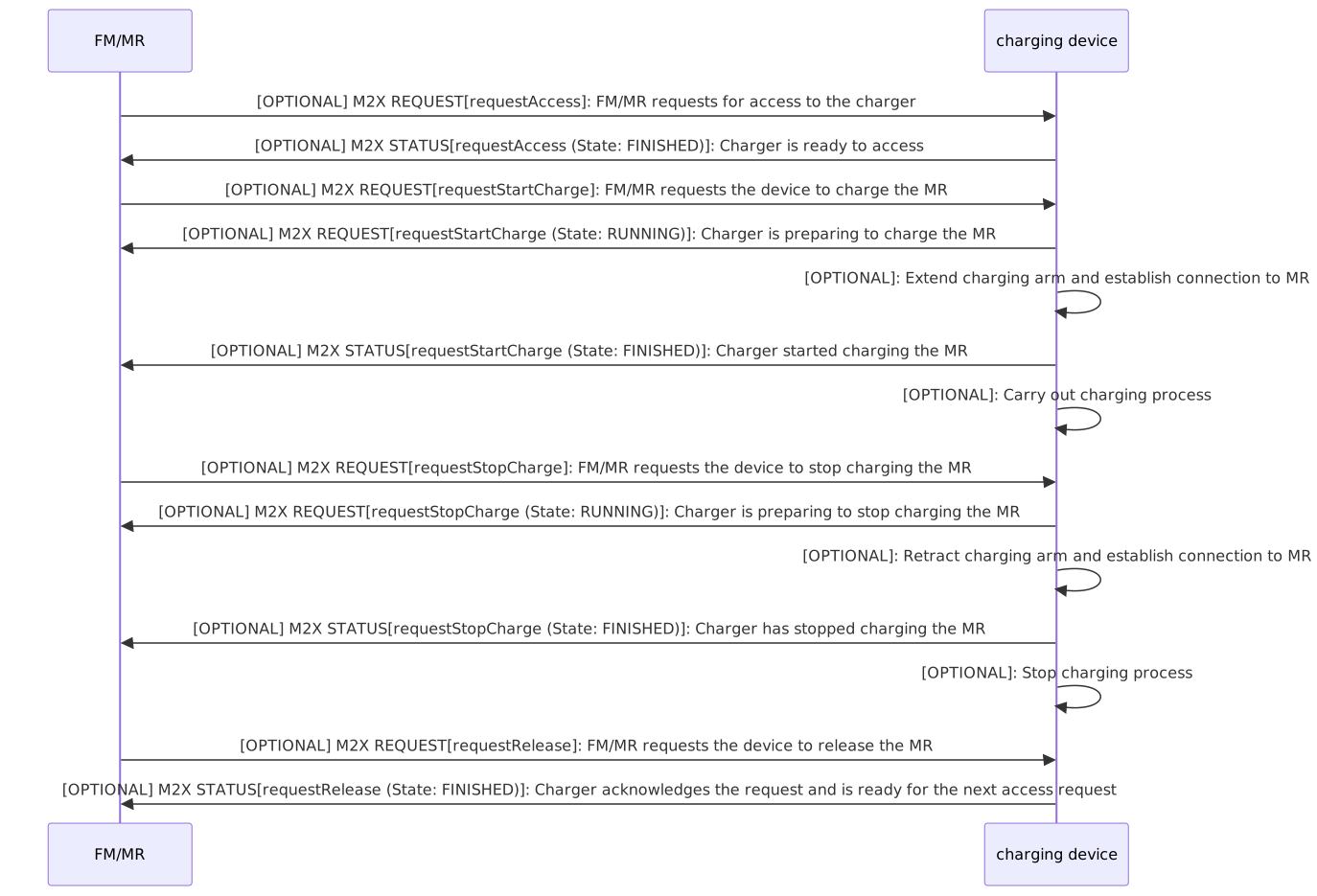
11.4. Topics
The communication with a charging device is done via the following topics:
Type |
Topic schema |
Description |
Factsheet |
charging_device/v1.0.0/charging_device_example/factsheet |
Used for requesting the factsheet of the charging device. |
Request |
charging_device/v1.0.0/charging_device_example/request_* |
Used for communication of requests for the charging device: requestAccess, requestStartCharge, requestStopCharge, requestRelease, requestFactsheet, requestCancel |
State |
charging_device/v1.0.0/charging_device_example/state |
Topic for communicating the current state of the charging device and information about received request messages. |
11.5. Charging device JSON schemas and subtopics
The M2X charging device interface uses the following JSON schemas and subtopics for the communication between station and MR/FM.
type |
used for |
schema (link) |
charging device factsheet |
Self-description of the charging device. |
|
request |
Communication of the requests for the charging device. |
|
charging device state |
Communication of the state of the charging device itself. |
11.6. Requests
The requests for charging devices are described below. All requests, associated parameters and their states are predefined in the respective JSON schemas or tables. There can only be one active request per participant with a peripheral device. This applies to every peripheral device and must be actively monitored by FM. Old requests are deleted by requestCancel. Old open requests can be read from the states after failure. The following requests are required for creating and updating charging devices:
-
requestAccess,
-
requestStartCharge,
-
requestStopCharge,
-
requestRelease,
-
requestFactsheet,
-
requestCancel.
11.6.1. Predefined requests
The following two tables describe the predefined requests for the charging device interface, their parameters, and their states from RUNNING to FINISHED.
request |
description |
parameter |
requestAccess |
MR/FM requests the permission to access the charging device. |
chargingSessionId (string) |
requestStartCharge |
Request to start charging a MR at a charging device. |
chargingSessionId (string) |
requestStopCharge |
Request to stop charging a MR at a charging device. |
chargingSessionId (string) |
requestRelease |
MR/FM requests to release the charging device. MR has left the charging area. |
chargingSessionId (string) |
requestFactsheet |
Request factsheet from a charging device. |
- |
requestCancel |
MR/FM requests to cancel the current request. |
chargingSessionId (string) |
request |
RUNNING |
PAUSED |
FINISHED |
FAILED |
PENDING |
requestAccess |
- |
- |
Access is granted and charging device is ready for charging. |
Access cannot be granted. A failed request shall correspond with an error. |
Request is waiting to get executed. |
requestStartCharge |
Charger is preparing to charge the MR. |
- |
Charging device started charging the MR. |
Charging failed. A failed request shall correspond with an error. |
Request is waiting to get executed. |
requestStopCharge |
Charging device is preparing to stop the charging process. |
- |
Charging device stopped charging. |
Stopping the charge failed. A failed request shall correspond with an error. |
Request is waiting to get executed. |
requestRelease |
- |
- |
Charging device confirms the release of the access and is ready for the next request. |
Release cannot be done. Failed release requests shall correspond with an error. |
- |
requestFactsheet |
- |
- |
- |
- |
- |
requestCancel |
- |
- |
Request canceled. |
Request cannot be canceled. |
- |
11.7. Charging device state
The following section describes the states of the charging device. You can find the JSON schema for the charging device state here: Charging device state.
11.7.1. Charging device state JSON structure
The charging device state consists of the JSON-objects listed in the following table.
field |
data type |
description |
timestamp |
string |
Timestamp in ISO8601 format (YYYY-MM-DDTHH:mm:ss.sssZ). The timestamp defines the point in time at which the message was sent. |
version |
string |
Version of the M2X protocol [Major].[Minor].[Patch] (e.g. 1.3.2). |
serialNumber |
string |
Serial number of the charging device. |
manufacturer |
string |
Manufacturer of the charging device. |
connectionState |
string |
enum: ONLINE, OFFLINE, CONNECTION_BROKEN. ONLINE: connection between charging device and broker is active. OFFLINE: connection between charging device and broker has gone offline in a coordinated way. CONNECTION_BROKEN: The connection between charging device and broker has unexpectedly ended. |
chargingDeviceState { |
object |
The charging device state contains the current status of the charging device, including its requests. |
chargingDeviceId |
string |
Unique identifier of the individual charging device. |
currentCharging |
object |
Current charging process. |
chargingSessionId |
string |
Unique identifier of the charging process. |
descriptor |
string |
Description of the charging process. |
requestStates |
array |
Array of upcoming and current requests. |
requestId |
string |
Id of a request to be referred to in this state. |
chargingProcess |
object |
Charging process. |
charging |
string |
Current charging process (CHARGING, DONE, IDLE). |
temperature |
number |
Current temperature during the charging process. |
chargingRate |
number |
Current charging rate during the charging process. |
derating |
boolean |
Indicates if the charging device is in derating mode. |
descriptor |
string |
Description of the charging process. |
requestType |
string |
requestType of the request. Optional: Only for informational or visualization purposes. |
requestStatus |
string |
State of the request. Enum: RUNNING, PAUSED, FINISHED, FAILED, PENDING. |
resultDescription |
string |
Description of the result. Errors will be transmitted in errors. |
operatingHours |
number |
Total operating hours of the charging device. |
errors [error] { |
array |
Array of error-objects. All active errors of the charging device should be in the list. An empty array indicates that the charging device has no active errors. |
errorType |
string |
Type of error. |
requestId |
string |
Id of the request that is caused or related to the error. |
errorDescription |
string |
Verbose description of error. |
errorLevel |
string |
Description of the error level, which is warning or fatal. WARNING: charging device is ready to start (e.g., maintenance cycle expiration warning). FATAL: charging device is not in running condition, user intervention required. |
} |
||
} |
11.8. Charging device factsheet
A factsheet is provided for the self-description of the charging device. It describes the charging device overall as well as its capabilities. You can find the factsheet JSON schema here: Charging device factsheet.
11.8.1. Factsheet JSON structure
The factsheet consists of the JSON-objects listed in the following table.
field |
data type |
description |
timestamp |
string |
Timestamp in ISO8601 format (YYYY-MM-DDTHH:mm:ss.sssZ). The timestamp defines the point in time at which the message was sent. |
version |
string |
Version of the M2X protocol [Major].[Minor].[Patch] (e.g. 1.3.2). |
manufacturer |
string |
Manufacturer of the charging device. |
serialNumber |
string |
Serial number of the charging device. |
chargingDeviceDescriptor |
string |
Describes the charging device for human readability, e. g. vertical, above ground, underfloor charger. |
chargingDeviceGeometry |
object |
Describes the geometry of the charging device. |
position { |
object |
Position of the charging device in the factory-coordinate system. |
x |
number |
The x-position in factory-coordinate system. |
y |
number |
The y-position in factory-coordinate system. |
z |
number |
Z-position in factory-coordinate system. |
} |
||
chargingDeviceFootprint { |
object |
Describes the footprint and orientation of the charging device in the factory-coordinate system. |
x-left |
number |
x-left offset of the charging position. |
x-right |
number |
x-right offset of the charging position. |
y-left |
number |
y-left offset of the charging position. |
y-right |
number |
y-right offset of the charging position. |
theta |
number |
Orientation of the charging position in the factory coordinate system. |
} |
||
chargingPosition { |
object |
Position of the area where the MR has to drive to be charged in the factory coordinate system. |
x |
number |
The x-position in factory-coordinate system. |
y |
number |
The y-position in factory-coordinate system. |
z |
number |
The z-position in factory-coordinate system. |
tolerance { |
object |
Acceptable tolerance for the charging position. |
x-left |
number |
x-left offset of the charging position. |
x-right |
number |
x-right offset of the charging position. |
y-left |
number |
y-left offset of the charging position. |
y-right |
number |
y-right offset of the charging position. |
theta |
number |
Orientation of the charging position in the factory coordinate system. |
} |
||
} |
||
chargingDeviceId |
string |
ID number of the charging device. |
chargingDeviceRequests [chargingDeviceRequest] { |
array |
Simplified description of possible charging device requests. Enum: requestAccess, requestStartCharge, requestStopCharge, requestRelease, requestFactsheet, requestCancel. |
maxChargingRate |
number |
Maximum charging rate of the charging device. |
mainsVoltage |
number |
Mains voltage of the charging device. |
communicationType |
string |
Used Communication type at the charging device. |
} |
12. List of abbreviations
| abbreviation | description |
|---|---|
AGV |
Automated guided vehicle |
AMR |
Autonomous mobile robot |
FM |
Fleet management |
LCU |
Load-carrying unit |
LHP |
Load handling point |
LHS |
Load handling station |
LHU |
Load handling unit |
M2X |
Machine to X |
MC |
Master control |
MR |
Mobile robot |
PoI |
Point of interest |
TO |
Transport order |
VDA |
Verband der Automobilindustrie (Association of the Automotive Industry) |
VDI |
Verein Deutscher Ingenieure (Association of German Engineers) |
VDMA |
Verband Deutscher Maschinen- und Anlagenbau e. V. (German Association of Mechanical and Plant Engineering e. V.) |
13. Glossary
| term | description |
|---|---|
Door |
A door is a self managed device that has a own factsheet. In front of the door is an transition area that is managed by the door itself. Once a MR is in front of the door, it can request to transit/cross the door. Other areas around or behind the door are managed by the FM. |
Fleet management (FM) |
Also known as master control (MC). FM describes the management, planning, control and monitoring of vehicle fleets. This involves coordinating, evaluating and optimizing vehicle routes, taking into account certain influencing parameters. A FM Service is available for every MR. It can be either centralized or decentralized. Centralized in terms of coordinating the underlying MRs, e.g. VDA 5050. In terms of decentralized planning the MR has an own FM-Service included locally. |
Load handling |
Load handling refers to the handover of a load at a transfer point or point of interest. This includes the entry, the physical handover/manipulation and the exit of an MR at a station. Once the physical load transfer of a MR is in progress, it should not be paused. |
Load handling point (LHP) |
A load handling point is a physical point of a LHS where the load is transferred or changed/manipulated. Only one MR can interact with a LHP at the same time. The LHP can be approached from different directions. |
Load handling station (LHS) |
A load handling station serves as a point of interest at which the load is transferred or changed/manipulated. The station can have multiple LHPs which are comparable to a VDA 5050 “node”. To avoid confusion regarding the VDA 5050, it is called LHP. The LHS will provide no traffic management. The station will only manage itself. The LHS factsheet includes the geometry of the physical station (footprint of the station). The area around is managed by the FM or traffic management. |
Load handling unit (LHU) |
The load handling unit (LHU) is the object that is transferred between the MR and the LHS. |
Mobile robot (MR) |
Uniform collective term in the context of M2X for all types of vehicles/robots that use the protocol. This includes for example automated guided vehicles (AGVs) or autonomous mobile robots (AMRs). |
Point of interest (PoI) |
A point of interest is a virtual or physical space in the environment. A unique identifier is used. At the PoI, the MR can perform actions such as PICK, DROP or VIA. A PoI can also be used to provide coordinates of the location, for example. A LHS or LHP can also be a PoI. A PoI can also be a group of PoIs. |
Signaling device |
A signaling device is a self-managed device that has its own factsheet. The device can describe itself and its properties. For example, for traffic lights it can show red, yellow, and green lights. |
Transport order (TO) |
The TO consists of a collection of objectives that can be extended during the execution of a TO. A TO shall contain at least one objective. An objective is a description of an atomic transport step (WHAT and WHERE), e.g. transport 'Pallet 1' to 'storage location 5'. |
Upper layer system |
The upper layer system is the next higher system to M2X in communication. This can be an ERP, a WMS, a manual order generation (for example with a button push at a station), etc. |